# Classification Technical Overview (/docs/classification/classification-technical-overview)
## Intro to Classification with Transcend [#intro-to-classification-with-transcend]
Transcend uncovers and classify sensitive data across structured, semi-structured, and unstructured data systems, enabling unparalled coverage of data estate and giving you peace of mind.
## Structured Data [#structured-data]
### Intro [#intro]
Structured data is anything that lives in a traditional relational database, characterized by tables with rows and columns. Many companies
### Approach [#approach]
Structured Discovery employs an ensemble of five methods for classifying data, applied in the following order:
1. **Property Name Matching**: Identifies data categories based on column/field names
2. **Regular Expression Content Matching**: Uses pattern matching to identify data in specific formats
3. Sombra **Large Language Model (LLM)**: Uses AI within your environment to analyze data content
4. **Transcend-Hosted Metadata-Only LLM**: Uses AI to analyze metadata without accessing content
This sequential approach is designed for both efficiency and accuracy. We begin with simpler, more computationally efficient methods for straightforward classifications, and only progress to more complex methods when needed:
- **Optimize Resource Usage**: Simple methods like Property Name Matching require minimal computational resources and can quickly identify common data types.
- **Progressive Complexity**: Each subsequent method employs more sophisticated analysis techniques, using increasingly detailed information about the data.
- **Fall-Through Design**: If a datapoint isn't classified with high confidence by one method, it "falls through" to the next, more nuanced method.
- **Balance Speed and Accuracy**: This approach ensures we use the least intensive method capable of making an accurate classification.
### 1. Property Name Matching [#1-property-name-matching]
This method examines the name of each field (column) and matches it against known data categories. For example:
- A column named `email` is classified as containing `EMAIL`
- A field called `birth_date` matches the `DATE_OF_BIRTH` category
- Common variations and format differences are considered
- System-specific prefixes and suffixes (like Salesforce's `__c`) are accounted for
Property Name Matching provides high specificity (few false positives) but lower sensitivity (may miss some matches). It requires no access to the actual data content.
### 2. Regular Expression Content Matching [#2-regular-expression-content-matching]
You can define custom pattern-matching rules to identify specific data formats. To manage these patterns:
1. Navigate to the [Data Inventory > Data Categories](https://app.transcend.io/data-map/data-inventory/data-categories) page
2. Select a data category
3. Add or edit regular expressions for that category
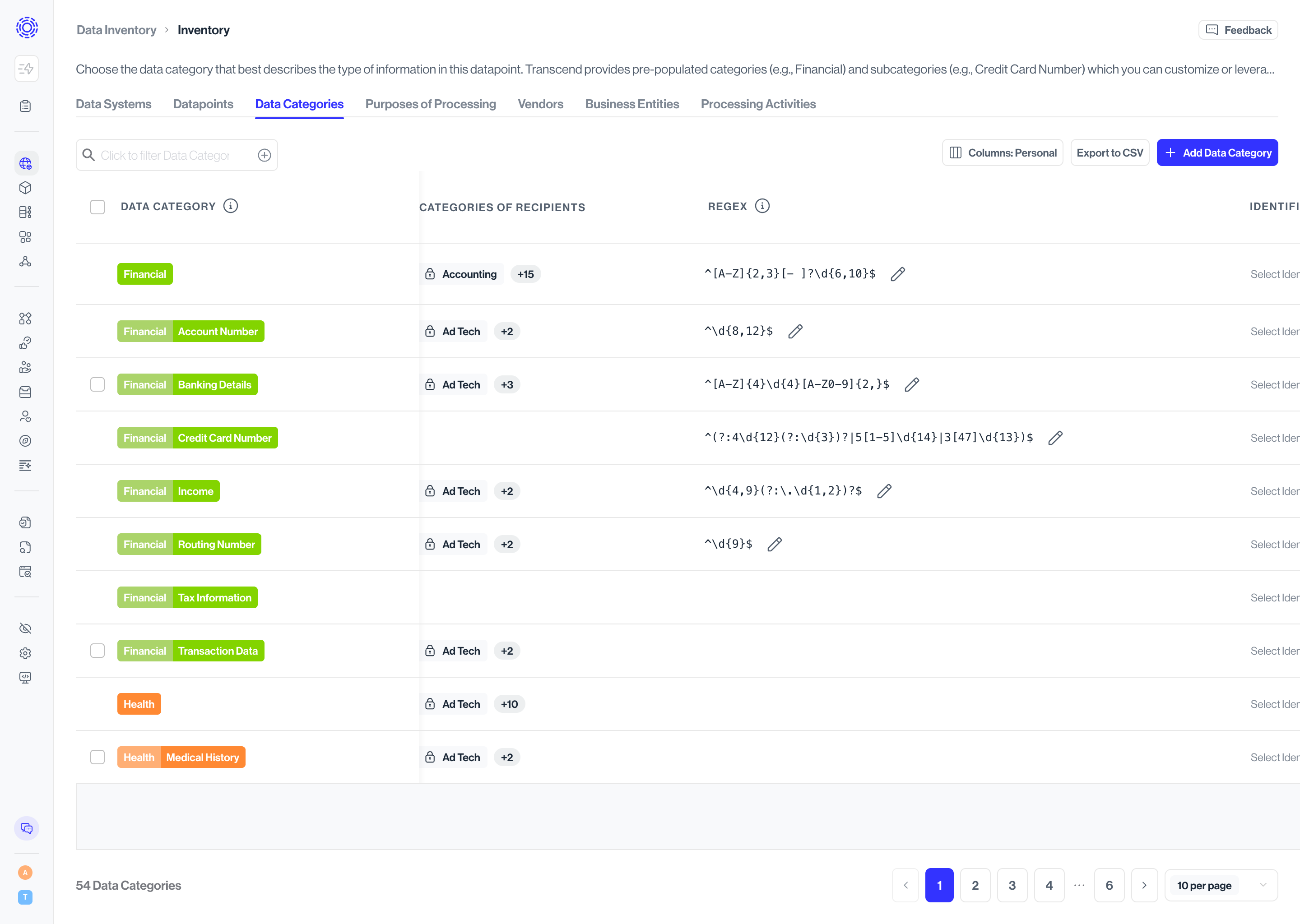
**Best practice**: Create specific patterns that avoid false positives. For example:
- Good: `/[A-Z0-9a-z._%+-]+@[A-Z0-9a-z.-]+\.[A-Za-z]{2,}/` for email addresses
- Problematic: `\d+-\d+-\d+-\d+` for phone numbers (too generic, would match many non-phone numbers)
These custom regular expressions work for both Structured and Unstructured Discovery. Columns matching your patterns will appear with "Regex Matching" as the classification method.
### 3. Sombra Large Language Model (LLM) [#3-sombra-large-language-model-llm]
For data not classified by the previous methods, our advanced LLM classifier analyzes both the metadata and content samples. This model:
- Runs within your environment for maximum data security
- Analyzes up to 200 characters of sample data
- Considers column names, table context, and data patterns
This approach requires:
- Minimum Classifier version 3.0.6 and Sombra version 7.226.3
- GPU-enabled infrastructure (recommended: AWS `g6.xlarge` instance)
See our [Hosted LLM Classifier](../sombra/deploying/customizing-sombra/llm-classifier.mdx) documentation for deployment details.
### 4. Transcend-Hosted Metadata-Only LLM [#4-transcend-hosted-metadata-only-llm]
For organizations not ready to host their own LLM, we offer a cloud-based classification option that:
- Analyzes only metadata (table and column names, descriptions)
- Does not process actual data content
- Requires no additional infrastructure
This becomes the fallback if the self-hosted LLM is unavailable. While effective, it may occasionally misclassify fields where the name is ambiguous without seeing sample data.
### 5. (Deprecated) Random Forest ML Model [#5-deprecated-random-forest-ml-model]
Our legacy classification approach used a statistical machine learning technique called random forests. We're phasing out this method, but you may still see some predictions from it in your results.
### Method Comparison [#method-comparison]
Each classification method uses different information sources, as summarized below:
| Method | Datapoint Name | Datapoint Description | Category Description | Data Content Samples |
| ----------------------------------- | -------------- | --------------------- | -------------------- | -------------------- |
| Property Name Matching | ✓ | | | |
| Regular Expression Content Matching | | | | ✓ |
| Self-Hosted Large Language Model | ✓ | ✓ | ✓ | ✓ |
| Transcend-Hosted Metadata-Only LLM | ✓ | ✓ | ✓ | |
## Semi-Structured Data [#semi-structured-data]
### Intro [#intro-1]
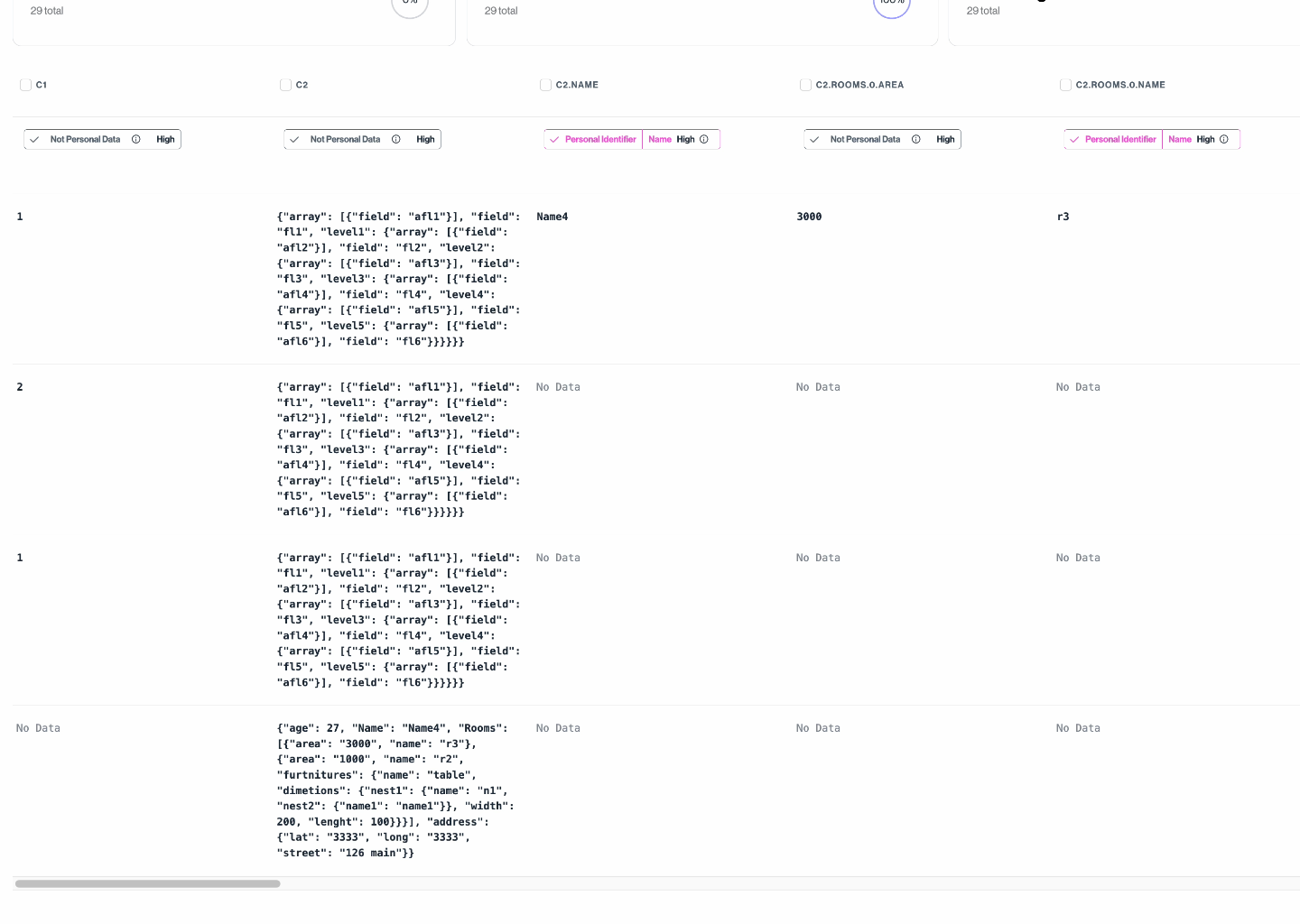
Many data systems store semi-structured data, such as blobs of JSON or Parquet files. Where possible, Transcend flattens or "unnests" semi-structured data into a more "structured" format, enabling greater granularity in classification.
### How JSON flattening works in Transcend [#how-json-flattening-works-in-transcend]
Any field containing data with a JSON structure will be expanded to generate new derived datapoint. The following steps are involved in the generation of derived datapoints:
1. During discovery, we capture the data type of each datapoint.
2. During the sampling process, if a datapoint's content is of type JSON, we flatten each sample into unique paths to fields that contain primitive types. Note: we only traverse the JSON structure up to 5 levels deep or until the path length is less than 100 characters.
3. We merge paths and their associated values from all samples.
4. Each unique path is now considered a derived datapoint and is independently classified to achieve more accurate predictions.
5. These derived datapoints are shown as separate datapoints on the dashboard.
6. When a parent datapoint is deleted, all of its derived datapoints are also deleted.
7. When a derived datapoint is triggered for re-classification, we resample its parent datapoint and regenerate the derived datapoints based on the samples collected.
In the following picture, you can see expanded derived datapoints from `c2` datapoint which is a column from a MySQL table containing JSON data.
## Unstructured Data [#unstructured-data]
### Intro [#intro-2]
Unstructured Discovery employs two primary methods to classify personal data in file contents:
### 1. Regular Expression Content Matching [#1-regular-expression-content-matching]
This method uses pattern matching to identify specific data formats within file contents. You can configure your own regular expressions to recognize data patterns specific to your organization:
1. Navigate to [Data Inventory > Data Categories](https://app.transcend.io/data-map/data-inventory/data-categories)
2. Select a data category
3. Add or edit regular expressions for that category

**Best practice**: Create specific patterns that avoid false positives. For example:
- Good: `/[A-Z0-9a-z._%+-]+@[A-Z0-9a-z.-]+\.[A-Za-z]{2,}/` for email addresses
- Problematic: `\d+-\d+-\d+-\d+` for phone numbers (too generic, would match many non-phone numbers)
When the system finds content matching your defined patterns, it classifies that content according to the associated data category.
### 2. Named Entity Recognition (NER) [#2-named-entity-recognition-ner]
For more sophisticated identification of personal data, Unstructured Discovery can use Named Entity Recognition:
- Uses AI to identify personal data that may not follow strict patterns
- Runs in your environment for maximum data security
- Can identify names, addresses, IDs, and other personal information in context
This approach requires:
- Minimum Classifier version 3.3.1 and Sombra version 7.261.0
- GPU-enabled infrastructure (recommended: AWS `g6.xlarge` instance)
For deployment details, see our [Hosted LLM Classifier](../sombra/deploying/customizing-sombra/llm-classifier.mdx) documentation.
## Classification Results [#classification-results]
After scanning and classifying your unstructured data, you'll see results organized by:
- **File location**: Where the file containing personal data was found
- **File type**: The format of the file (PDF, DOCX, etc.)
- **Data categories**: What types of personal data were identified
- **Classification method**: Which method identified the personal data
This information helps you understand where sensitive data exists in your unstructured content and take appropriate actions for privacy compliance.