# Cron Job integration (/docs/integrations/custom/cron-job-integration)
When a new data subject request is made, you can setup a "Cron Job" integration that will block the request from completing until a script is run to process the request. Your script can list out the set of requests that currently need to be processed, run the job to erase, opt out or find data related to that user, and then POST back to the Transcend API to notify that the job has been completed for that request.
This integration is similar to the [Server Webhook integration](./server-webhook-integration.mdx) except for the fact that your script will use our API to list active requests instead of receiving a webhook notification when new requests are made. Using the "Cron Job" integration, your team can manually run the script when it is most convenient, or put the script on a schedule to batch jobs at a time when the database is not actively being used.
### Check out our Examples [#check-out-our-examples]
We have examples on [GitHub](https://github.com/transcend-io/examples). There is a full working [Python example](https://github.com/transcend-io/examples/blob/master/python/cron.py) and a [Ruby example](https://github.com/transcend-io/examples/tree/main/ruby/cron.rb).
## 1. Create the Integration on Transcend [#1-create-the-integration-on-transcend]
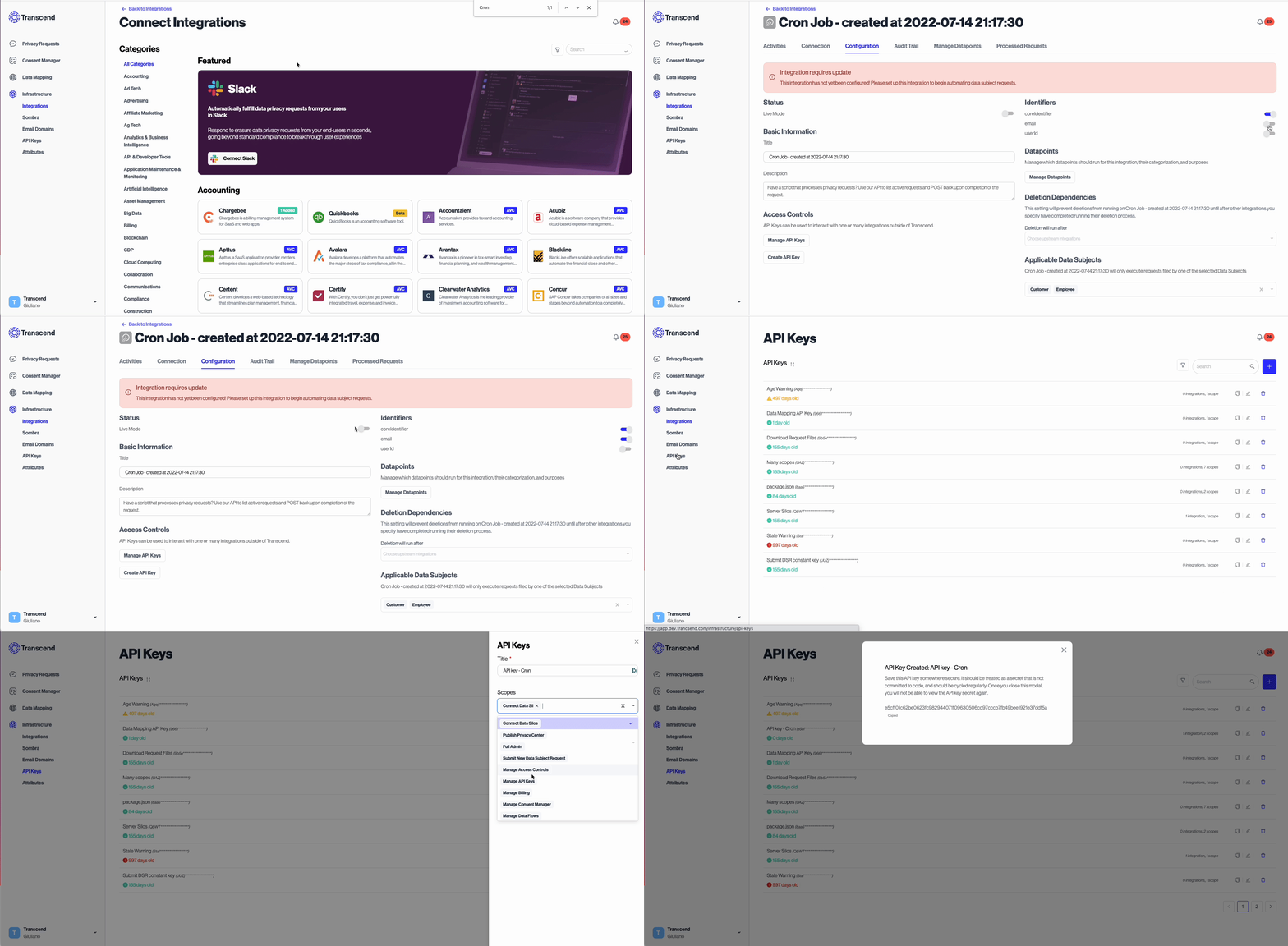
1. Go to your [Integrations](https://app.transcend.io/infrastructure/integrations/new?integrationName=cron) to connect the "Cron Job" integration type.
2. Give your integration a title (e.g. "Data Warehouse Script")
3. Click Connect to create the integration.
4. Navigate to this integration in your Integrations and select the "Manage Datapoints" tab to configure what types of requests your server should be notified about.
5. Create a [new API key](https://app.transcend.io/infrastructure/api-keys) for this integration and copy the key. This will be used to authenticate your requests to the Transcend API.
## 2. List Active Requests Using our API [#2-list-active-requests-using-our-api]
Your script can list our the active data subject requests that need to be processed by your script.
See the [API reference](/docs/api-reference/custom-integration/get-v1-data-silo-id-pending-request-action-type).
```http
GET /v1/data-silo//pending-requests/
```
You can use offset based pagination if needed. The default page size is `50`.
```http
GET /v1/data-silo//pending-requests/?limit=20&offset=50
```
This route returns a JSON response:
```json
{
"items": [
{
"identifier": "test+attributes@transcend.io",
"type": "email",
"coreIdentifier": "test+attributes@transcend.io",
"dataSiloId": "88971fdc-5570-4f0e-9481-a9936df1fc09",
"requestId": "f41670b1-2439-4389-9943-4cfaa8553381",
"requestCreatedAt": "2022-09-28T06:14:58.043Z",
"nonce": "eyJhbGciOiJIUzI1NiIsInR5cCI6IkpXVCJ9.eyJzdWIiOiIxMjM0NTY3ODkwIiwibmFtZSI6IkpvaG4gRG9lIiwiaWF0IjoxNTE2MjM5MDIyfQ.SflKxwRJSMeKKF2QT4fwpMeJf36POk6yJV_adQssw5c",
"daysUntilOverdue": 28,
"locale": "en",
"dataSubjectType": "customer",
"country": "US",
"countrySubDivision": "US-CA",
"attributes": [
{
"key": "client_handle",
"values": ["acme"]
}
]
},
{
"identifier": "+123412345",
"type": "phone",
"coreIdentifier": "test+access@transcend.io",
"dataSiloId": "88971fdc-5570-4f0e-9481-a9936df1fc09",
"requestId": "ebb31ea5-0e9b-4aae-85f6-00a4527af137",
"locale": "fr-FR",
"dataSubjectType": "employee",
"country": null,
"countrySubDivision": null,
"nonce": "eyJhbGciOiJIUzI1NiIsInR5cCI6IkpXVCJ9.eyJzdWIiOiIxMjM0NTY3ODkwIiwibmFtZSI6IkpvaG4gRG9lenp6enp6eiIsImlhdCI6MTUxNjIzOTAyMn0.shMmFXcM3VqXGZryrgoIWlY_7Rhbpk76CeFh98iP4M8",
"requestCreatedAt": "2022-09-30T06:14:57.824Z",
"daysUntilOverdue": 30,
"attributes": []
},
{
"identifier": "test+erasure@transcend.io",
"type": "email",
"coreIdentifier": "test+erasure@transcend.io",
"dataSiloId": "88971fdc-5570-4f0e-9481-a9936df1fc09",
"locale": "en",
"dataSubjectType": "employee",
"country": "US",
"countrySubDivision": "US-VA",
"nonce": "eyJhbGciOiJIUzI1NiIsInR5cCI6IkpXVCJ9.eyJzdWIiOiIxMjM0NTY3ODkwIiwibmFtZSI6IkpvaG4gRG9lIiwiaWF0IjoxNTE2MjM5MDIyfQ.SflKxwRJSMeKKF2QT4fwpMeJf36POk6yJV_adQssw5c",
"requestId": "6e093ca0-e73d-401d-9c00-2f051894533a",
"requestCreatedAt": "2022-09-30T06:14:57.945Z",
"daysUntilOverdue": 30,
"attributes": []
},
{
"identifier": "test+opt-out@transcend.io",
"type": "email",
"coreIdentifier": "test+opt-out@transcend.io",
"dataSiloId": "88971fdc-5570-4f0e-9481-a9936df1fc09",
"nonce": "eyJhbGciOiJIUzI1NiIsInR5cCI6IkpXVCJ9.eyJzdWIiOiIxMjM0NTY3ODkwIiwibmFtZSI6IkpvaG4gRG9lIiwiaWF0IjoxNTE2MjM5MDIyfQ.SflKxwRJSMeKKF2QT4fwpMeJf36POk6yJV_adQssw5c",
"requestId": "9ba77be5-a3c3-495f-80c1-2bc539fdd0af",
"locale": "en",
"dataSubjectType": "customer",
"country": "US",
"countrySubDivision": "US-CA",
"requestCreatedAt": "2024-09-30T06:14:57.945Z",
"daysUntilOverdue": 30,
"purpose": {
"purpose": "Marketing",
"enabled": true,
"preferences": [
{
"topic": "Frequency",
"choice": {
"selectValue": "Daily"
}
},
{
"topic": "Channel",
"choice": {
"selectValues": ["Sms", "Email"]
}
},
{
"topic": "GoPaperless",
"choice": {
"booleanValue": true
}
}
]
},
"attributes": []
}
]
}
```
Here `identifier` is the lookup key, the `type` is the unique name of the identifier [defined in settings](https://app.transcend.io/privacy-requests/identifiers), and the `nonce` is an ID you will need to pass back when you go to upload data.
## 3. Look up and Operate on User Data [#3-look-up-and-operate-on-user-data]
Using the `items[*].type` and `items[*].identifier`, implement the request type on your database or internal system. This part of the process is going to be a unique to your business. This may involve:
- returning or removing rows from a database
- returning or removing file from a filesystem
- replacing fields containing personal data with anonymized placeholders
Please consult with your Transcend account representative on recommendations or guidelines for this process.
## 4. Notify the Transcend API of Completion [#4-notify-the-transcend-api-of-completion]
Once your server has successfully completed processing a pending request, notify Transcend so the data subject request (DSR) can move forward. The method depends on the request type.
### Erasure, opt-out, and opt-in requests [#erasure-opt-out-and-opt-in-requests]
Call [PUT](/docs/api-reference/custom-integration/put-v1-data-silo) [`/v1/data-silo`](/docs/api-reference/custom-integration/put-v1-data-silo) on `api.transcend.io` with these headers from the [GET /v1/data-silo/\{id}/pending-requests/\{type}](/docs/api-reference/custom-integration/get-v1-data-silo-id-pending-request-action-type) endpoint:
| GET field | PUT `/v1/data-silo` |
| ---------- | ---------------------------------- |
| requestId | Header: `x-transcend-request-id` |
| dataSiloId | Header: `x-transcend-data-silo-id` |
In the request body, identify which profile you completed:
| GET field | PUT body field |
| ---------- | ---------------------- |
| identifier | profiles\[i].profileId |
To complete a request, set PUT profiles\[i].profileId to the identifier field from that item in your GET pending-requests response (see section 2). Each item in items includes an identifier — the profile lookup value your integration uses (for example, an email address or username). Do not use the GET item's profileId field for PUT profiles\[i].profileId. Despite the same name, GET profileId is Transcend's internal database ID, while PUT profiles\[i].profileId expects the lookup value from GET identifier.
Example:
```json
{
"profiles": [{ "profileId": "" }],
"status": "RESOLVED"
}
```
### Access requests [#access-requests]
For a data subject access request, send a POST request to Transcend indicating that processing is complete. This also includes uploading any data associated with the end user.
Please refer to [this guide](../../dsr-automation/api-integration/responding-to-dsrs.mdx) for information on responding to DSRs.
## 5. Hosting or Running Your Script [#5-hosting-or-running-your-script]
Depending on the type of request and region where the data subject resides, the law requires the response to these requests within some specified period of time. This normally ranges between the range of 2 weeks to 2 months. With this in mind, if you have the ability to run your script at least once per week, this should normally be sufficient for any type of request.
Please consult with your Transcend account representative on recommendations or guidelines for this process. We recommend running the script once per day during the hours in which the database is under the least amount of stress.