# Assessment Actions (/docs/overview/rules-automation-overview/actions-assessments)
Recurring compliance reviews are date-bound obligations, and most teams still track them in a calendar or a spreadsheet. Rules Automation lets you set the cadence once and have Transcend send the assessment for you.
### **Send Assessment** [#send-assessment]
There are two action types available for Assessments in Rules Automation:
| Action | What it does | Use case examples |
| ------------------- | -------------------------------------------------------------------------------------------------- | -------------------------------------------------------------------------------------------------------------------------------------- |
| Send re-assessment | Resends an assessment that already exists, to the same reviewers, with previous answers pre-filled | The same vendor, supplier, processing activity, etc. is reviewed on a repeating cycle and last cycle's answers are the starting point |
| Send new assessment | Creates a fresh assessment from a Published template and sends it to respondents you choose | Each cycle should start clean, or the recipients change from run to run |
Both actions may be triggered by either trigger type, schedule (Cron) or inbound webhook. A rule has one action, so one rule sends one assessment.
### When to use Rules Automation vs. Assessment Triggers [#when-to-use-rules-automation-vs-assessment-triggers]
Rules Automation and [Assessment Triggers](../../assessments/scoring-and-automated-actions/assessment-triggers.mdx) are distinct tools.
- **Assessment Triggers:** Built directly into an assessment template. Use these when a specific response to an assessment question should automatically launch a new assessment.
- **Rules Automation:** A standalone tool for broader workflows. Use this when cross-platform or external events need to trigger an action (which includes, but is not limited to, sending an assessment).
| | Send Assessment (Rules Automation) | Assessment Triggers |
| ----------------- | ---------------------------------------------------------------------------------------------------- | -------------------------------------------------------------------------------------- |
| Fires on | A schedule, or an inbound webhook | How a respondent Answers a question in a another assessment |
| Configured in | [Developer Tools → Rules Automation](https://app.transcend.io/infrastructure/rules-automation/rules) | [Assessment Template Builder](https://app.transcend.io/assessments/form-templates/new) |
| Example use cases | Annual vendor review, 45-day supplier cycle, quarterly RoPA refresh | Risk escalation, conditional vendor onboarding, internal routing |
- **Rules Automation:** Use for actions driven by time or external events.
- **Assessment Triggers:** Use for actions driven by specific responses in an assessment.
**Note:** These features work together. An assessment launched by a rule will still honor its template triggers.
## Send re-assessment (Scheduled) [#send-re-assessment-scheduled]
Trigger an already assigned **or** approved assessment.
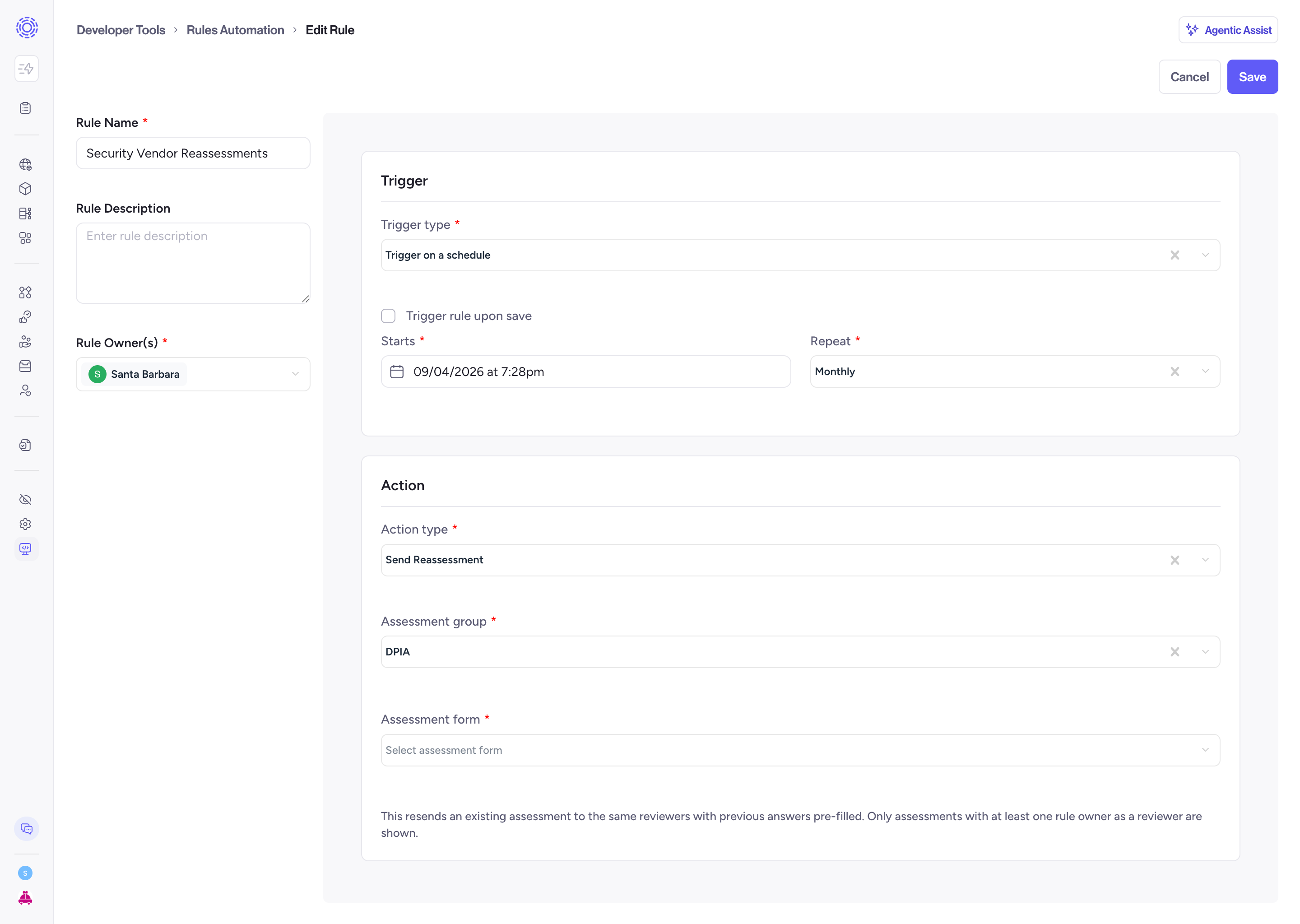
| Status when the rule fires | What happens | Outcome shown in History |
| ------------------------------------------------ | ---------------------------------------------------------------------------------------------------------------------------------------------------------------------------- | ------------------------ |
| Pending, In Progress | Resends the invite to eligible assignees. Nothing is reset. | Invite resent |
| In Review, Changes Requested, Approved, Rejected | Reopens the existing assessment, the same behavior as **Request re-assessment** in the Assessments UI. Previous answers are pre-filled. No new assessment record is created. | Reassessment requested |
The assessment has to have been sent at least once before a rule can act on it. If you want a clean instance from a template every cycle, use **Send new assessment** below.
### Before you start [#before-you-start]
- The assessment must already exist.
- At least one rule owner must be a Reviewer of that assessment. The picker only lists assessments that pass this check, so if an assessment is missing from the dropdown, this is almost always why.
### Configure it [#configure-it]
1. Go to Developer Tools → Rules Automation → Rules and click **+ New Rule**.
2. Fill in Rule details: name, optional description, and one or more owners. Owners matter here, they determine which assessments you can select.
3. Under Trigger, choose **Trigger on a schedule (Cron)**, then set Starts and Repeat.
4. Under Action, choose **Send re-assessment**.
5. Select the Assessment.
6. Save, then Activate.
| Field | Required | Notes |
| ---------- | -------- | -------------------------------------------------------------------------------------------------------------------------------------------------------------------------- |
| Assessment | Yes | The existing assessment to resend. It goes to the same reviewers with previous answers pre-filled. Only assessments where at least one rule owner is a Reviewer are shown. |
There is no respondent or reviewer field in this mode. That is deliberate, see below.
### Reviewers and ownership [#reviewers-and-ownership]
- The rule cannot override reviewers or respondents. Whoever is assigned on the assessment receives it. If you need different people, change the assignment on the assessment itself.
- Ownership is re-checked on every run, not just when you save. If reviewer membership changes and no rule owner is a Reviewer any more, the run fails rather than sending.
- To fix that, either add a current reviewer as an owner of the rule, or add an existing rule owner as a reviewer on the assessment.
## Send new assessment [#send-new-assessment]
Creates a new assessment from a Published template each time the rule fires and sends it to the respondents you specify. Every run produces a separate assessment, so you get a distinct record per cycle rather than one form that keeps reopening.
### Before you start [#before-you-start-1]
- The template must be Published. Draft templates do not appear in the picker.
- Decide who the respondents are. They can be Transcend users or external people invited by email.
### Configure it [#configure-it-1]
1. Go to Developer Tools → Rules Automation → Rules and click **+ New Rule**.
2. Fill in Rule details: name, optional description, and one or more owners.
3. Under Action, choose **Send new assessment**.
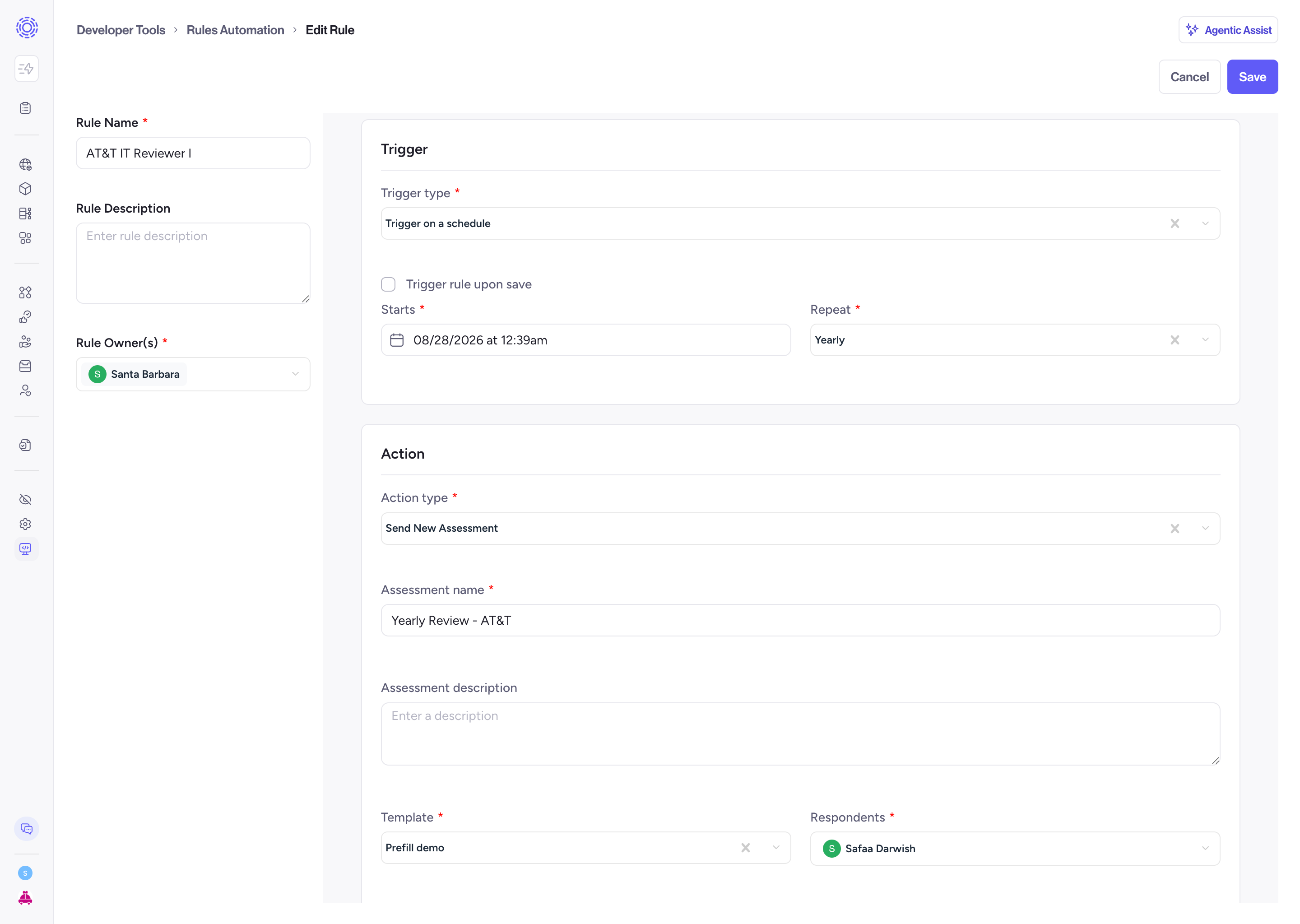
Fill in the fields below, then click save:
| Field | Required | Notes |
| --------------- | -------- | ------------------------------------------------------------------------------------------------------------- |
| Assessment name | Yes | Title for the assessment that gets created |
| Template | Yes | Must be a Published assessment form template |
| Respondents | Yes | One or more users, with or without a seat in Transcend. For someone without a seat, enter their email address |
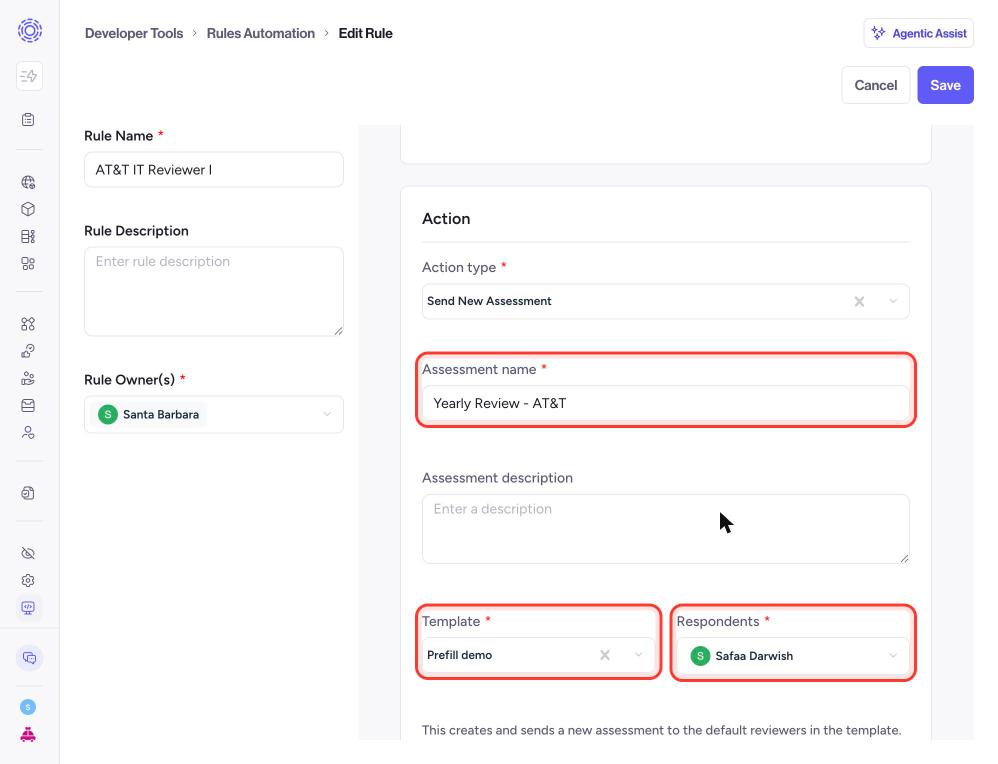
Activate your rule to kickoff cadence:
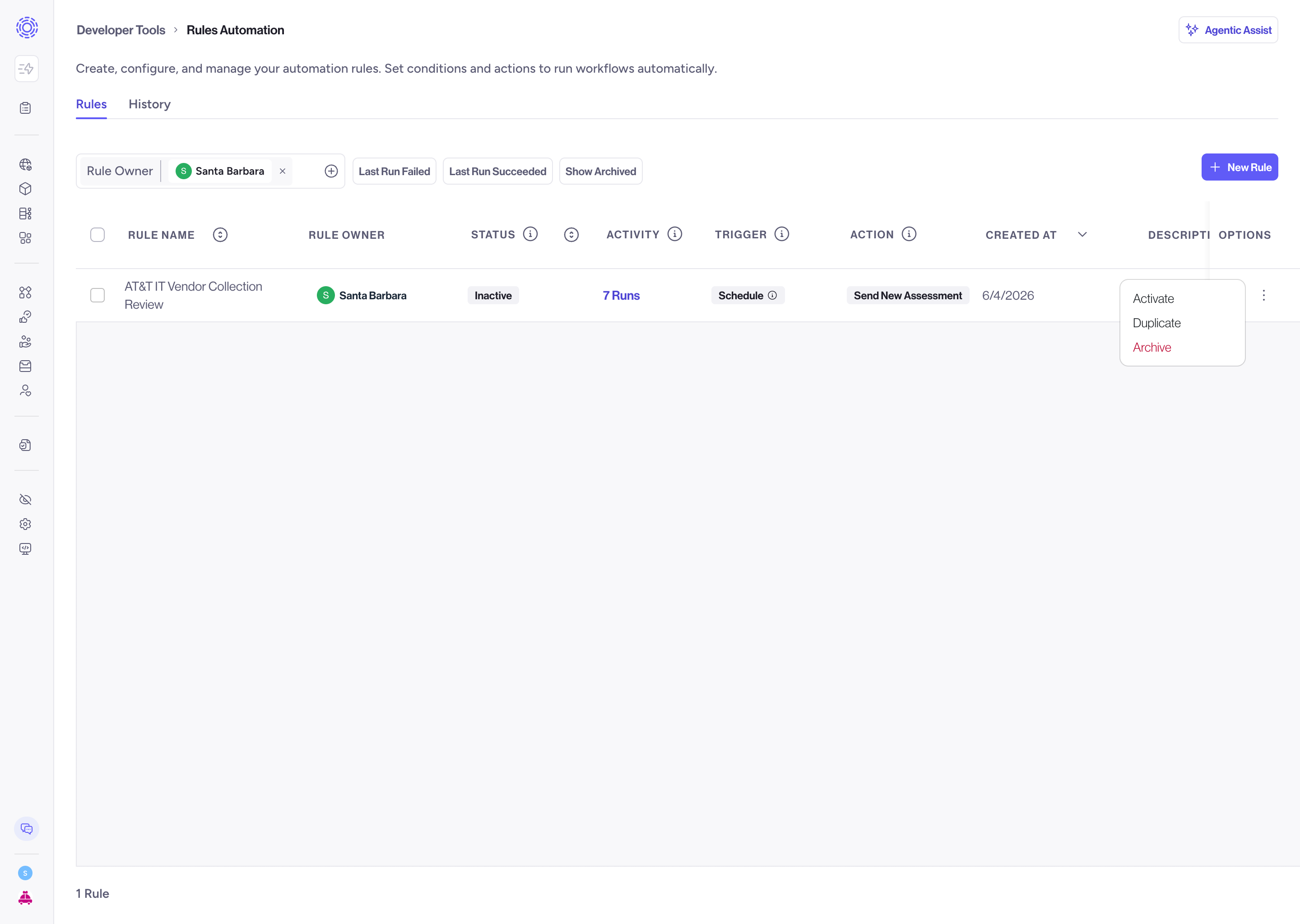
### What you cannot set from a rule [#what-you-cannot-set-from-a-rule]
- **Section-level respondents.** A rule assigns respondents at the form level only. If your template routes sections to different people, assign those inside Assessments.
- **Reviewers.** The assessment uses the default reviewers configured on the assessment group. See [Reviewing Assessments](../../assessments/distributing-reviewing-and-tracking/reviewing-assessments.mdx) for how to set a default reviewer.
## Example cadences [#example-cadences]
| Obligation | Mode | Repeat setting |
| --------------------------------- | ------------------- | ----------------------- |
| Annual vendor re-assessment | Send re-assessment | Yearly, starting Jan 15 |
| DORA Tier 2 supplier review | Send re-assessment | Custom, every 45 days |
| SOC 2 access recertification | Send new assessment | Custom, every 90 days |
| Processing activity review (RoPA) | Send re-assessment | Yearly |
For obligations with a fixed interval, use Custom with a day count rather than Monthly or Yearly. A quarter ranges from 89 to 92 days, so "every 90 days" and "quarterly" drift apart over time.
## Check what happened [#check-what-happened]
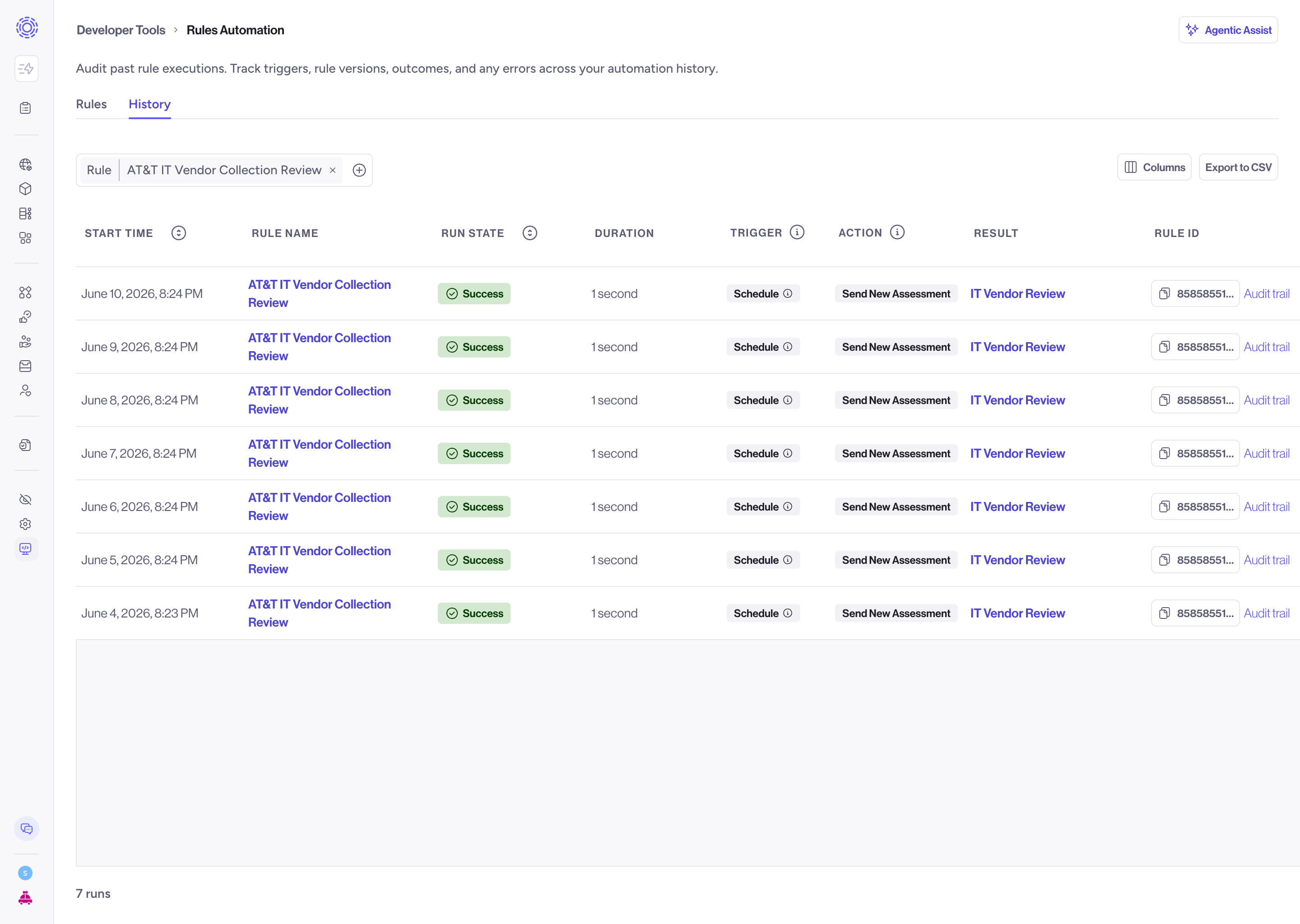
The [History tab](https://app.transcend.io/infrastructure/rules-automation/history) lists every run of every rule: the rule name, start time, duration, and the outcome (created, invite resent, reassessment requested, or a failure with its error). Each run links to the audit trail for that execution.
## Troubleshooting [#troubleshooting]
| Symptom | Cause | Fix |
| ---------------------------------------------------- | ------------------------------------------------------------------ | ----------------------------------------------------------------------------------- |
| The assessment is not in the re-assessment dropdown | No rule owner is a Reviewer of it | Add a reviewer as a rule owner, or add a rule owner as a reviewer on the assessment |
| The template is not in the new-assessment dropdown | The template is not Published | Publish it, or pick a published one |
| Run failed with a reviewer error | Reviewer membership changed after the rule was saved | Same fix as the first row, then re-run |
| Run failed and did not retry | The target assessment was deleted, or its template was unpublished | Point the rule at a valid target. This failure is terminal by design |
| Nothing fired at the scheduled time | The rule is in Draft or Inactive | Activate it. Only Active rules run |
| Respondents got an invite instead of a re-assessment | The assessment was still Pending or In Progress | Expected. Nothing to fix |
## Using a webhook trigger for Assessment Actions [#using-a-webhook-trigger-for-assessment-actions]
A webhook fires when another system tells Transcend something happened e.g. a vendor's risk tier changed, a contract renewed, an employee's access was provisioned. The assessment action configuration is identical either way; only the trigger differs. For a comprehensive guide on configuring a Webhook Trigger, see Webhook User Guide.
### Prerequisites [#prerequisites]
- **Sombra deployment:** Webhook rules require a single-tenant Sombra. Multi-tenant instances do not support this feature.
- **Permissions:** Configuring these rules requires the **Manage Rules** scope.
- **Sending system:** The sending system must be able to store a URL and a signing secret.
### Configure it [#configure-it-2]
1. Create a rule as above, but under Trigger, choose **Inbound Webhook**.
2. Set the authentication. HMAC is the only method currently supported. Provide a **webhook signing secret**, an **HMAC algorithm**, and the **Signature header** name your sender uses. Store the secret somewhere safe — Transcend won't show it again unless you explicitly unlock the field when editing.
3. Choose your assessment action and fill it in exactly as you would for a scheduled rule.
4. Save. The success dialog shows the webhook URL for this rule. Copy it into your sender's configuration.
5. Activate the rule.
### Calling the webhook [#calling-the-webhook]
The request must be a `POST` with a JSON object or array body and a `Content-Type` of `application/json`. Your configured signature header carries the HMAC digest as lowercase hex. Default maximum body size is 1 MB.
A `200` means the request was accepted and queued, not that the assessment has been sent. The action runs asynchronously — check the History tab to confirm it actually completed.
Webhook ingestion only resolves Active rules. If the rule is in Draft, Inactive, or Archived, callers get `404 Webhook not found` rather than an error explaining why. A scheduled rule that isn't Active simply doesn't fire; a webhook rule that isn't Active actively rejects traffic.