DSR Request Statuses & Origins
Understand how DSRs progress through various statuses and where they originate from
Understanding the DSR Lifecycle
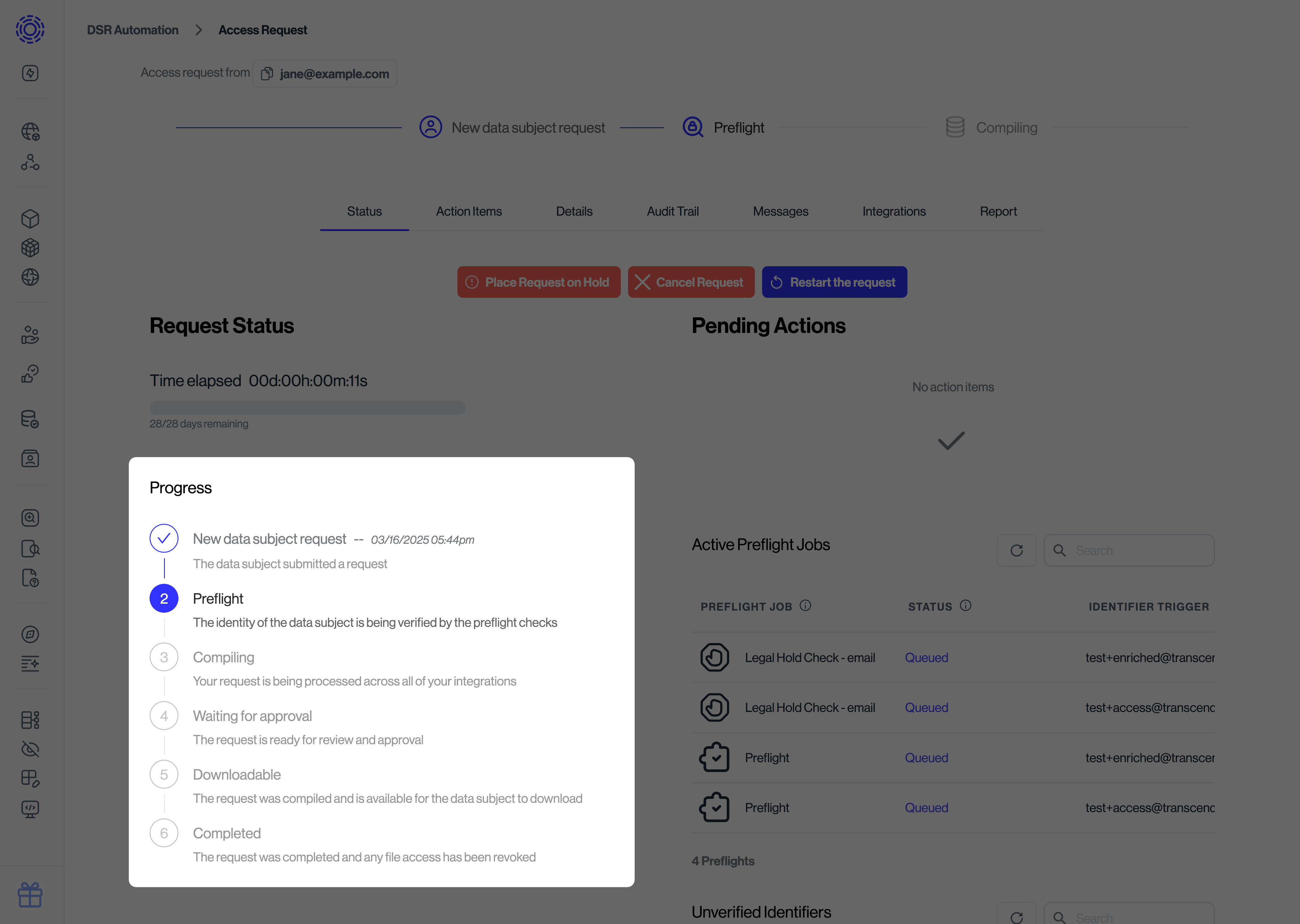
As a data subject request moves through the Transcend platform, it progresses through various statuses that indicate where it is in the fulfillment process. Understanding these statuses helps you track progress, identify bottlenecks, and explain the process to stakeholders.
You can view the current status of any request under the "Status" tab in the request details view:
Request Statuses by Category
DSR statuses are organized into logical groups based on the phase of the request lifecycle:
Initial Statuses
| Status | Technical Name | Description |
|---|---|---|
| Request Made | REQUEST_MADE | The initial status when a DSR is first submitted to the system. |
Verification & Validation Statuses
| Status | Technical Name | Description |
|---|---|---|
| Preflight | ENRICHING | Preflight jobs are actively running to verify the request and enrich identifiers. |
| Verification Failed | FAILED_VERIFICATION | The request failed email or phone verification and was automatically canceled. |
| On Hold | ON_HOLD | The request requires manual review by an administrator before proceeding. |
| Waiting | WAITING | The request is in a waiting period, allowing time for cancellation if needed. |
Processing Statuses
| Status | Technical Name | Description |
|---|---|---|
| Compiling | COMPILING | The system is actively searching for user data and applying preferences across connected systems. |
| Waiting for approval | APPROVING | Data has been compiled and is awaiting manual review before finalizing. |
Cancellation Statuses
| Status | Technical Name | Description |
|---|---|---|
| Canceled | CANCELED | The request was canceled by an administrator or through an automated rule. |
| Revoked | REVOKED | The request was canceled by the data subject themselves. |
Access Request Completion Statuses
| Status | Technical Name | Description |
|---|---|---|
| Completed | COMPLETED | The request has been fully processed across all systems. |
| Downloadable | DOWNLOADABLE | The compiled data is available for the subject to download (typically for 2 weeks). |
| View categories | VIEW_CATEGORIES | Data categories are available for review but the full data cannot be downloaded. |
Deletion Request Specific Statuses
| Status | Technical Name | Description |
|---|---|---|
| Delaying execution | DELAYED | The deletion is pending; data can be previewed and the request can still be canceled. |
| Removing data | SECONDARY | Deletion jobs are actively running. The deletion cannot be canceled at this point. |
| Approval after data removed | SECONDARY_APPROVING | Deletion is complete but requires approval before final notification. |
| Data removed | SECONDARY_COMPLETED | The deletion request has been successfully completed in full. |
Status Flow Diagram
The typical progression of a DSR follows this pattern:
┌────────────────┐     ┌────────────────┐     ┌────────────────┐     ┌────────────────┐
│  Request Made  │ ──▶ │   Preflight    │ ──▶ │   Compiling    │ ──▶ │   Completed    │
└────────────────┘     └────────────────┘     └────────────────┘     └────────────────┘
        │                                             │                      │
        │                                             │                      │
        ▼                                             ▼                      ▼
┌────────────────┐                            ┌────────────────┐     ┌────────────────┐
│  Verification  │                            │  Waiting for   │     │  Downloadable  │
│     Failed     │                            │    approval    │     │ (Access only)  │
└────────────────┘                            └────────────────┘     └────────────────┘
                                                      │
                                                      │
                                                      ▼
                                              ┌────────────────┐
                                              │ Removing data  │
                                              │(Deletion only) │
                                              └────────────────┘
                                                      │
                                                      │
                                                      ▼
                                              ┌────────────────┐
                                              │  Data removed  │
                                              └────────────────┘
Request Origins
The "origin" of a request indicates how it was initially submitted to Transcend. You can filter requests by origin in the "Incoming Requests" tab of the Admin Dashboard.
| Origin | Technical Name | Description |
|---|---|---|
| API | API | The request was submitted programmatically through the Transcend API. |
| Privacy Center | PRIVACY_CENTER | The user authenticated and submitted the request through your Privacy Center. |
| Admin Dashboard | ADMIN_DASHBOARD | An administrator manually created the request in the Transcend Admin Dashboard. |
| Shopify | SHOPIFY | The request was submitted via Shopify's platform through the Transcend Shopify app. |
Using Status Information
Understanding request statuses helps you:
- Track Progress: Monitor where requests are in the fulfillment pipeline
- Identify Bottlenecks: Find stages where requests are getting stuck
- Report on Compliance: Generate reports on request volumes and completion times
- Communicate with Stakeholders: Provide clear updates on request status to data subjects and team members
You can also use the Transcend API to poll request status programmatically.