Webhook User Guide
This guide walks you through creating and updating Rules Automation rules with an HTTP webhook trigger (focusing on HMAC authentication), and shows how to call the webhook URL. Use it with your Transcend Admin Dashboard
- A rule defines a custom function that runs when Transcend accepts a webhook.
- Each rule has a webhook trigger with a unique webhook ID embedded in the public URL.
Transcend’s rule-automation service receives POST requests, verifies authentication, then queues work so your function runs asynchronously. A 200 response indicates the request was accepted, not that the function has finished.
- To access Rules Automation, sign in to the Admin Dashboard. Your org must have the Rules Automation tool enabled.
- Go to Infrastructure → Developer Tools -> Rules Automation → Rules.
Click Create New Rule to open the rule wizard.
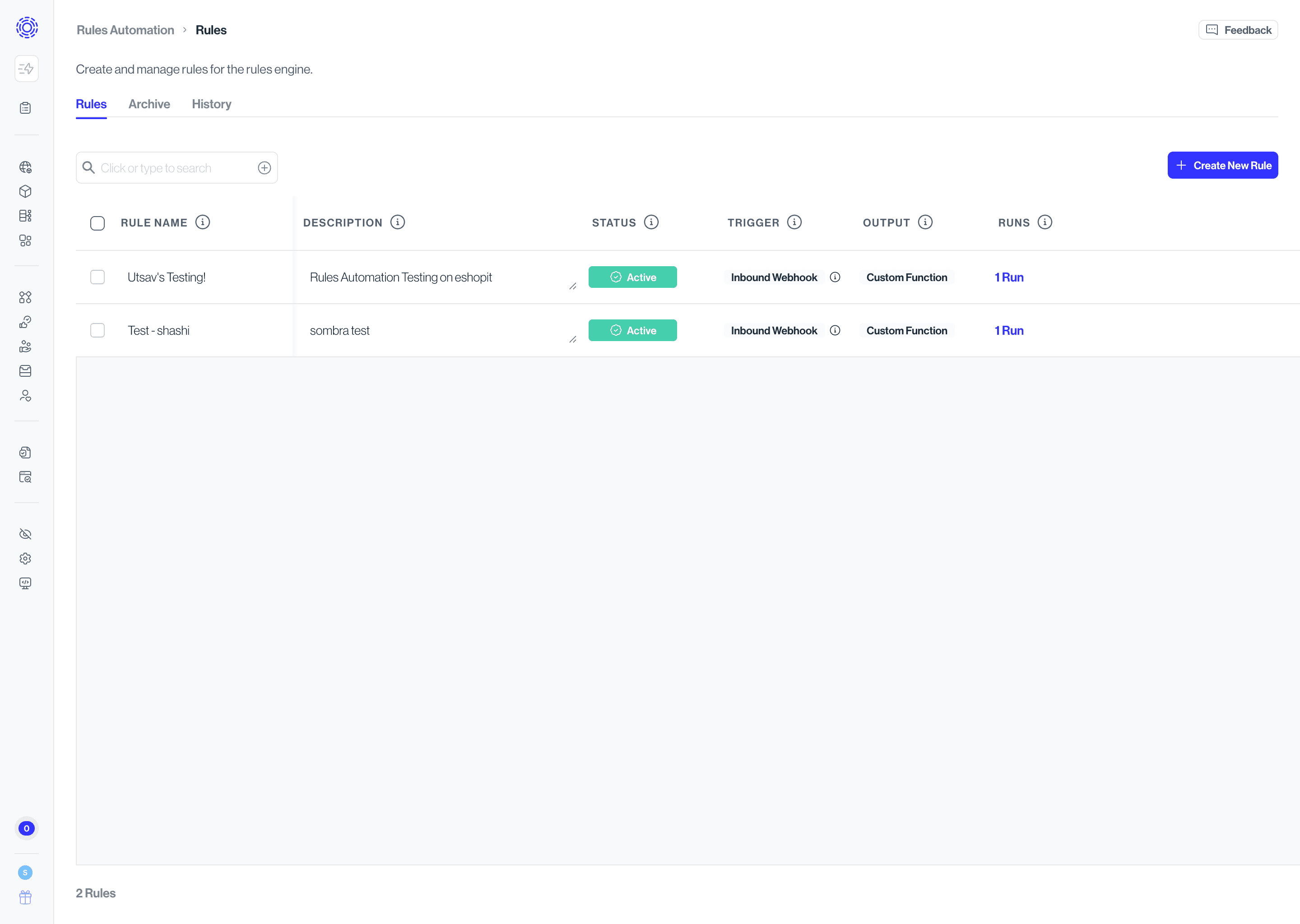
Start by opening Rules Automation and clicking Create New Rule.
Provide a rule title (required) and, optionally, a description and owners.
Your preferred Sombra must also be selected. Only single-tenant Sombra is allowed.
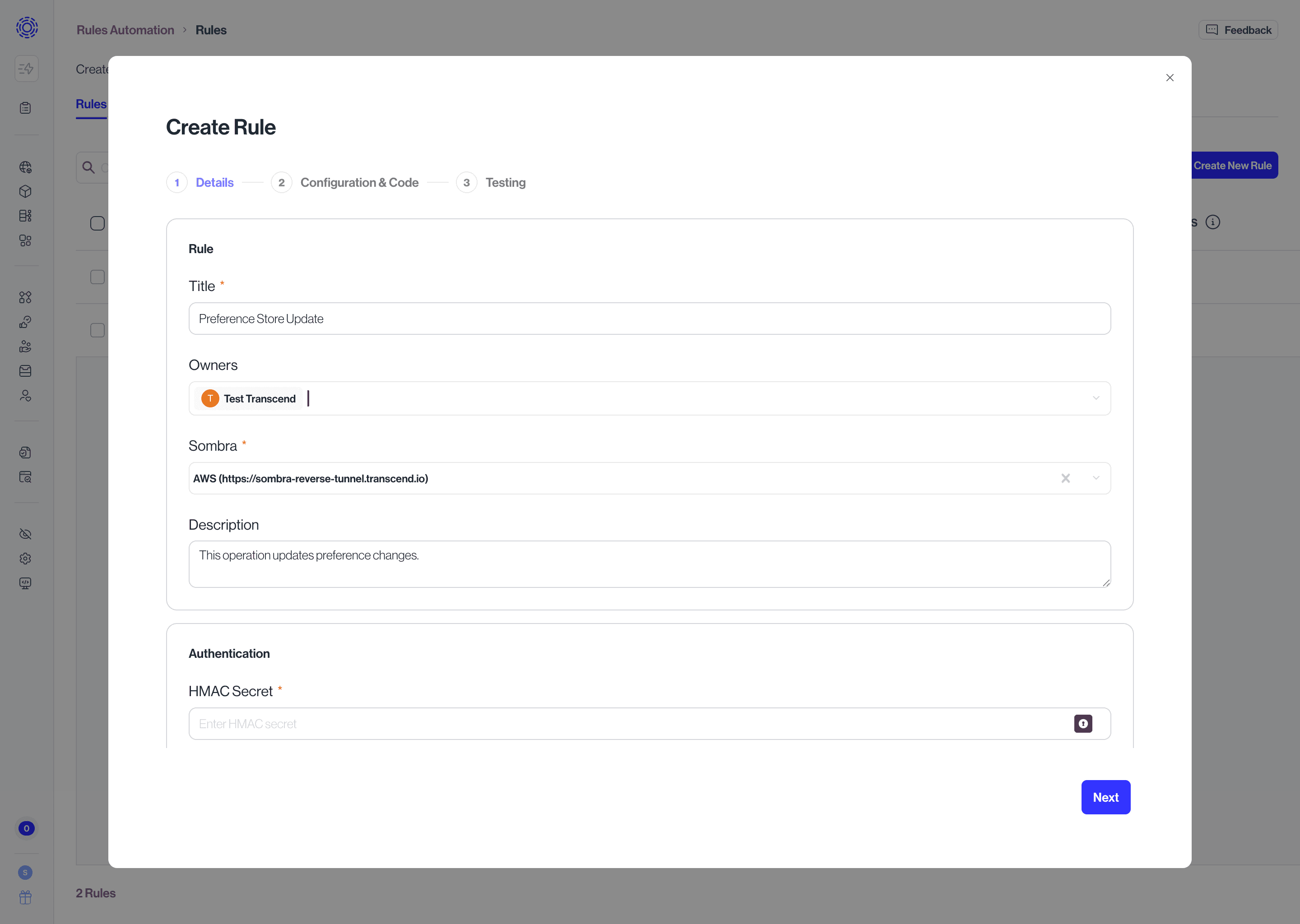
Only HMAC Authentication is allowed at this time.
Webhook signing secret (required): The shared secret your system will use to compute the HMAC signature. Store it securely. After saving, Transcend does not display the full secret again unless you edit the rule and explicitly unlock the field (see Updating a Rule).
HMAC algorithm (required): The hashing algorithm used to compute the signature. This must match the algorithm your webhook sender uses.
Signature header (required): The HTTP header name your sender includes the digest in. Use the exact header name your provider specifies in their documentation.
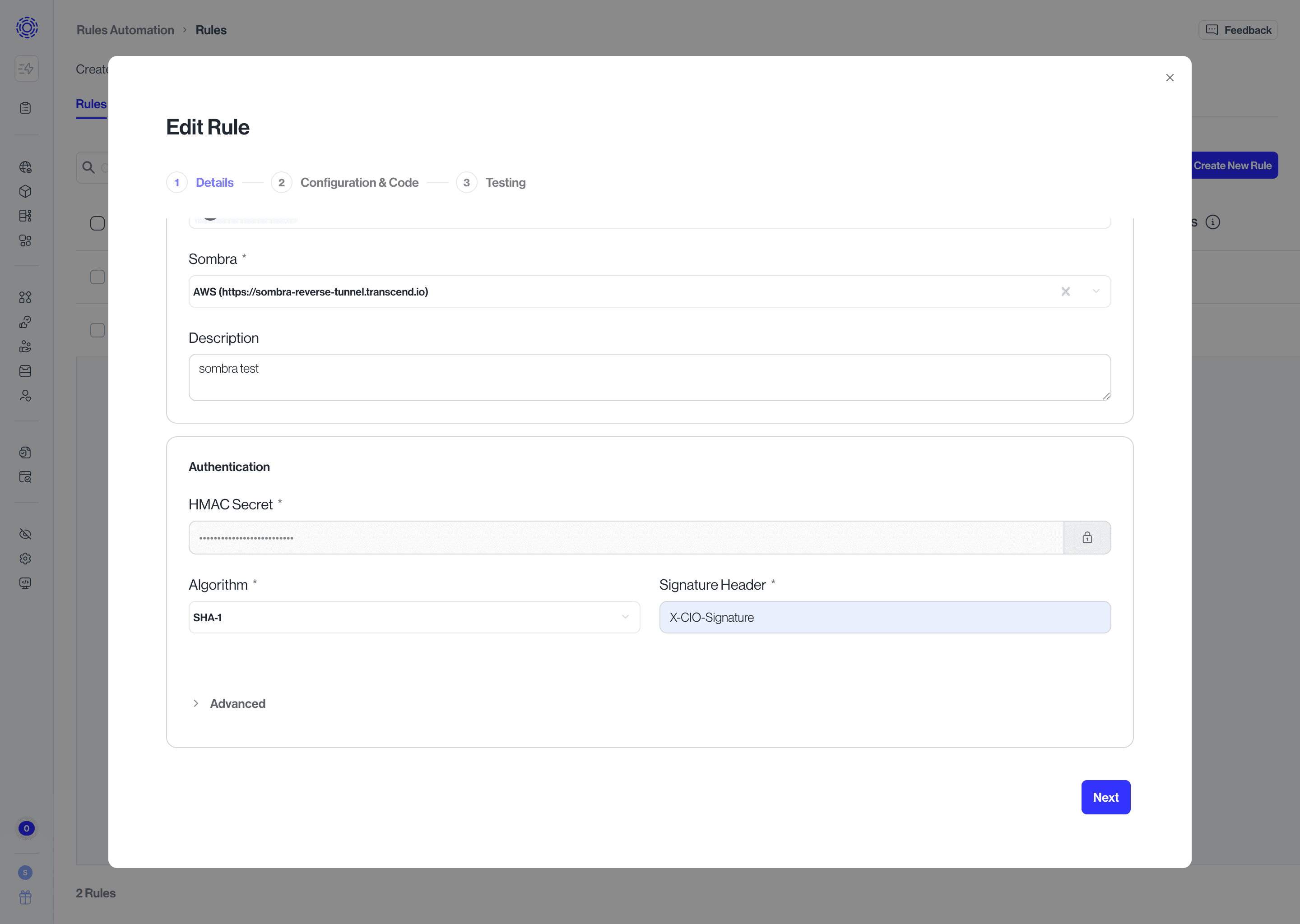
- Timestamp header (optional): required only if you use a signed message template that includes a timestamp (see HMAC requirements).
- Signed message template (optional): only if the sender does not sign the raw body alone. Example (Stripe-style):
v1:${timestamp}:${body} - Use Transcend’s placeholders exactly:
${timestamp}— replaced with the value of the timestamp header you configured.${body}— replaced with the raw JSON body string as received (UTF-8).
Implement or paste your custom function and any environment variables your integration needs.
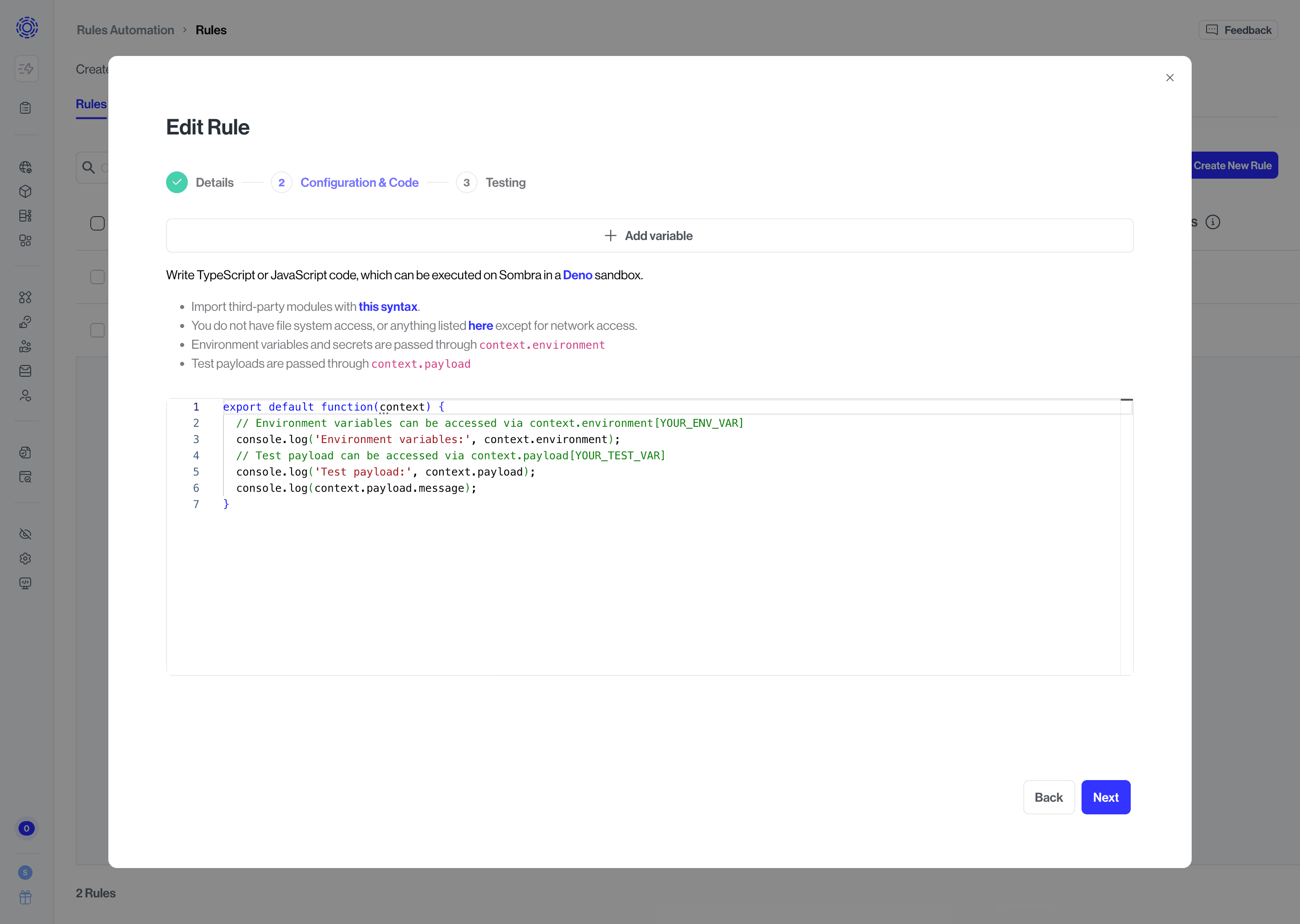
Run a test execution with sample JSON to validate the function before you rely on live webhooks.
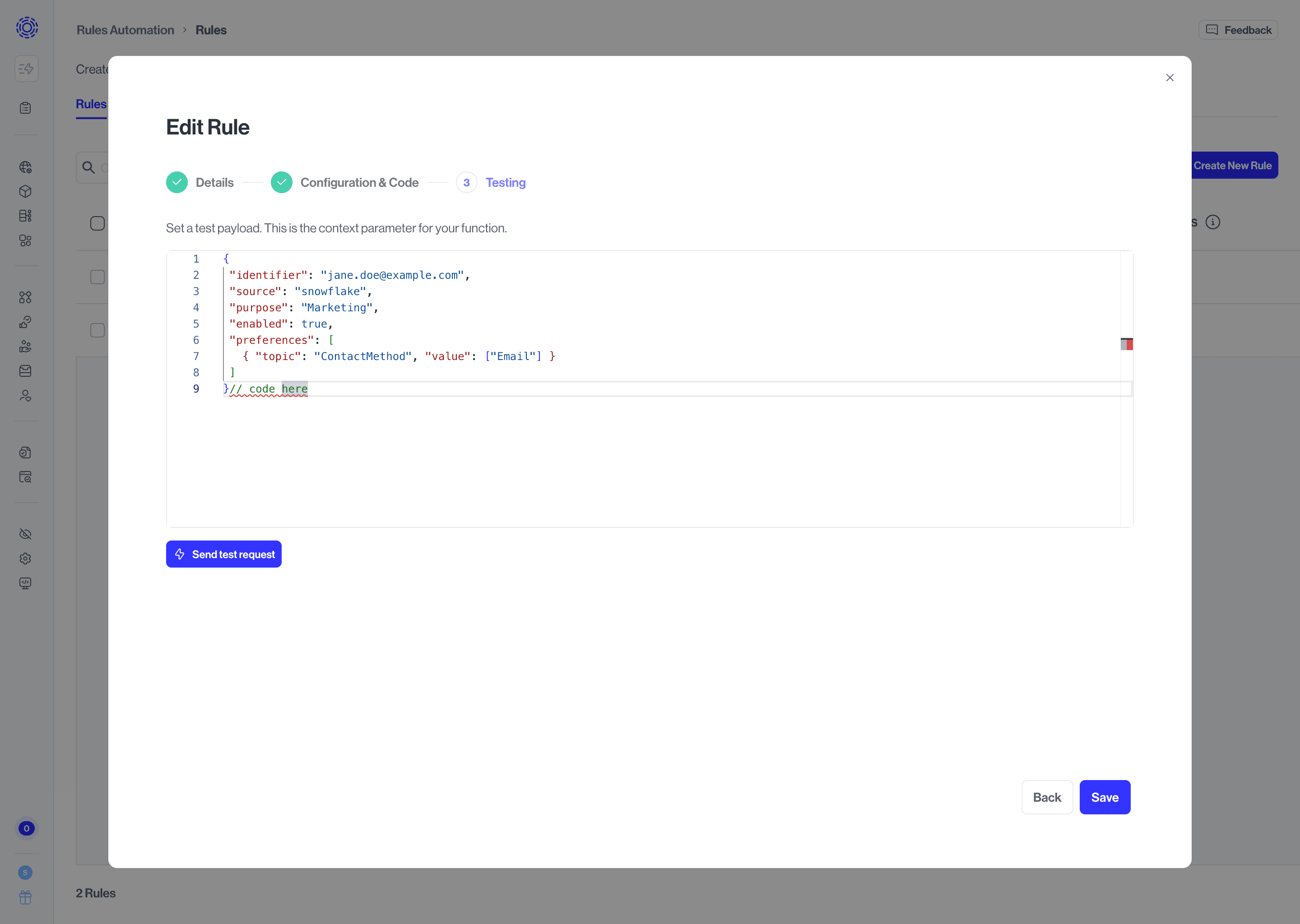
- Click Save. A success dialog shows the webhook URL for this rule. Copy and store it in your sender’s configuration.
- The URL is built from your environment’s configured base (shown in the product) and ends with your webhook ID (the webhook trigger’s ID), for example: /api/v1/webhooks/<webhook-id>.
- Webhook ingestion only resolves Active rules; otherwise callers typically receive 404 Webhook not found. New rules must already be in Active state.
- If it’s not in Active state, from the rules table, use the row actions to Set as Active when you are ready for production traffic.
- Go to Rules Automation
- In the Rules tab, open the rule by selecting the Edit (pencil icon) on the row of the rule you want to edit.
- The Edit Rule wizard appears.
- To rotate the HMAC secret, unlock the secret field when editing, enter the new secret, and save. Coordinate the change with your sender so both sides use the same key.
- If you change algorithm, signature header, timestamp header, or signed message template, update your sender to match.
After changes, confirm the rule is Active if you expect live webhooks.
| Requirement | Details |
| Method | POST only. |
| URL | The full webhook URL from the success dialog (includes your webhook ID). |
Content-Type | Must include application/json. |
| Body | A JSON object or array (not a bare string or number). Maximum size is enforced by Transcend (default 1 MB total body). |
| Signature | Your configured signature header must contain the HMAC digest, typically lowercase hex. |
Example (illustrative only, replace URL, header names, and body):
POST /api/v1/webhooks/your-webhook-id-here HTTP/1.1Host: <your-rule-automation-host>Content-Type: application/jsonX-Your-Signature: <hex-digest-or-sha256=hex-digest>{"event":"example","id":"123"}| Status | Meaning |
200 | Accepted and queued (accepted: true with a messageId). |
400 | Invalid JSON body. |
401 | Authentication failed (wrong secret, wrong signature, missing required headers). |
403 | Client IP not allowed (only if your org configured an IP allow list for the rule). |
404 | Unknown webhook ID or rule not Active. |
405 | Not POST. |
413 | Body too large. |
415 | Not JSON Content-Type. |
429 | Rate limit exceeded. Retry after the Retry-After interval. |
These points are common causes of 401 Invalid webhook signature when everything else “looks right.”
- Same secret The key configured in Transcend must be byte-for-byte what your sender uses to compute the HMAC.
- Same algorithm Must match the wizard selection and your sender.
- Correct signature header name Must match what you entered in the wizard (HTTP header names are compared case-insensitively on the wire, but your sender must send the header Transcend expects).
- Sign the same bytes Transcend verifiesTranscend verifies the HMAC over the raw request body (the exact bytes received), not a re-formatted or re-serialized JSON string. Pretty-printing, different key order, or extra spaces will change the digest.
- Raw body vs template
- If signed message template is empty: the HMAC is computed over the raw body only (Customer.io / Segment style).
- If signed message template is set: you must also set timestamp header, and the sender must place the same timestamp string in that header that was used when building the string to sign. The template must use
${timestamp}and${body}exactly as Transcend documents.
6. Hex digest The computed MAC must be encoded as hex in the header. Base64 signatures are not the default expectation unless your integration documentation says otherwise—confirm with Transcend support if your vendor only emits Base64.
Test Payload:
{
 "identifier": "jane.doe@example.com",
 "source": "snowflake",
 "purpose": "Marketing",
 "enabled": true,
 "preferences": [
   { "topic": "ContactMethod", "value": ["Email"] }
 ]
}// code here
Custom Function:
export default async function customFunction({ environment, payload, sdk }) {
  const apiKey = environment.TRANSCEND_API_KEY;
  const partition = environment.TRANSCEND_PARTITION;
  const identifierName = environment.IDENTIFIER_NAME || 'email';
  const defaultPurpose = environment.DEFAULT_PURPOSE || 'Marketing';

  if (!apiKey) {
    throw new Error('Missing environment.TRANSCEND_API_KEY');
  }

  if (!partition) {
    throw new Error('Missing environment.TRANSCEND_PARTITION');
  }

  const identifier = resolveIdentifier(payload);
  if (!identifier) {
    throw new Error('Could not resolve user identifier from payload');
  }

  const records = buildPreferenceRecords({
    payload,
    identifier,
    identifierName,
    partition,
    defaultPurpose,
  });

  if (records.length === 0) {
    throw new Error('No preference updates were produced from payload');
  }

  const response = await sdk.fetch('/v1/preferences', {
    method: 'PUT',
    headers: {
      'Content-Type': 'application/json',
      Authorization: `Bearer ${apiKey}`,
    },
    body: JSON.stringify({
      records,
      skipWorkflowTriggers: false,
    }),
  });

  if (!response.ok) {
    const body = await response.text();
    throw new Error(
      `Failed to upsert preferences: ${response.status} ${response.statusText} - ${body}`,
    );
  }
}

function resolveIdentifier(payload) {
  return (
    payload?.user?.email ||
    payload?.user?.id ||
    payload?.identifier ||
    payload?.coreIdentifier?.value ||
    payload?.requestIdentifier?.value ||
    payload?.extras?.profile?.identifier ||
    null
  );
}

function buildPreferenceRecords({
  payload,
  identifier,
  identifierName,
  partition,
  defaultPurpose,
}) {
  const timestamp = new Date().toISOString();
  const updates = Array.isArray(payload?.preferenceUpdates)
    ? payload.preferenceUpdates
    : [payload];

  return updates
    .map((update) => {
      const purpose = update?.purpose || defaultPurpose;
      const enabled = toBoolean(update?.enabled, true);
      const preferences = mapTopicChoices(update?.preferences);

      return {
        userId: identifier,
        partition,
        timestamp,
        identifiers: [{ name: identifierName, value: identifier }],
        purposes: [
          {
            purpose,
            enabled,
            ...(preferences.length > 0 ? { preferences } : {}),
          },
        ],
        metadata: [
          {
            key: 'source',
            value: String(update?.source || 'external-system'),
          },
        ],
      };
    })
    .filter(Boolean);
}

function mapTopicChoices(input) {
  if (!Array.isArray(input)) {
    return [];
  }

  return input
    .map((item) => {
      if (
        !item ||
        !item.topic ||
        item.value === undefined ||
        item.value === null
      ) {
        return null;
      }

      if (Array.isArray(item.value)) {
        return {
          topic: item.topic,
          choice: { selectValues: item.value.map(String) },
        };
      }

      if (typeof item.value === 'boolean') {
        return {
          topic: item.topic,
          choice: { booleanValue: item.value },
        };
      }

      return {
        topic: item.topic,
        choice: { selectValue: String(item.value) },
      };
    })
    .filter(Boolean);
}

function toBoolean(value, fallback) {
  if (typeof value === 'boolean') {
    return value;
  }

  if (typeof value === 'string') {
    if (value.toLowerCase() === 'true') {
      return true;
    }
    if (value.toLowerCase() === 'false') {
      return false;
    }
  }

  return fallback;
}
Test Payload:
{
  "vendor": {
    "name": "Acme Analytics Inc.",
    "description": "Product analytics and session replay for marketing sites.",
    "externalId": "VRM-2026-0042",
    "website": "https://www.acme-analytics.example",
    "headquartersCountry": "US",
    "headquartersSubdivision": "US-CA",
    "address": "100 Market St, San Francisco, CA 94105",
    "dpaUrl": "https://www.acme-analytics.example/legal/dpa",
    "dpaStatus": "CUSTOM_DPA",
    "businessEntity": "Engineering"
  },
  "requester": {
    "name": "Jordan Lee",
    "email": "jordan.lee@yourcompany.com",
    "team": "Procurement"
  },
  "approval": {
    "approvedBy": "alex.approver@yourcompany.com",
    "riskTier": "Medium"
  }
}
Custom Function:
export default async function ({ payload, environment, sdk }) {
  const apiKey = environment.TRANSCEND_API_KEY;
  if (!apiKey) {
    throw new Error('Missing TRANSCEND_API_KEY environment variable');
  }

  async function graphql(query, variables) {
    const res = await sdk.fetch('/graphql', {
      method: 'POST',
      headers: {
        Authorization: `Bearer ${apiKey}`,
        'Content-Type': 'application/json',
      },
      body: JSON.stringify({ query, variables }),
    });

    const body = await res.json();

    if (!res.ok || body.errors) {
      throw new Error(
        `Transcend GraphQL error (${res.status}): ${JSON.stringify(body.errors ?? body)}`,
      );
    }

    return body.data;
  }

  const vendor = payload.vendor ?? {};
  const requester = payload.requester ?? {};
  const approval = payload.approval ?? {};

  const { name } = vendor;
  if (!name) {
    throw new Error('payload.vendor.name is required');
  }

  const { createVendor } = await graphql(
    /* GraphQL */ `
      mutation RulesAutomationCreateVendor($input: CreateVendorInput!) {
        createVendor(input: $input) {
          vendor {
            id
            title
          }
        }
      }
    `,
    {
      input: {
        title: name,
        description:
          vendor.description ??
          `Imported from VRM (${vendor.externalId ?? 'no id'})`,
        websiteUrl: vendor.website,
        headquarterCountry: vendor.headquartersCountry,
        headquarterSubDivision: vendor.headquartersSubdivision,
        address: vendor.address,
        dataProcessingAgreementLink: vendor.dpaUrl,
        dataProcessingAgreementStatus: vendor.dpaStatus,
        contactName: requester.name,
        contactEmail: requester.email,
        businessEntityTitle: vendor.businessEntity,
        ownerEmails: [requester.email, approval.approvedBy].filter(Boolean),
        teamNames: requester.team ? [requester.team] : [],
        attributes: [
          {
            key: 'External Vendor ID',
            values: [vendor.externalId].filter(Boolean),
          },
          {
            key: 'Risk Tier',
            values: [approval.riskTier].filter(Boolean),
          },
          { key: 'Source', values: ['VRM Webhook'] },
        ].filter((a) => a.values.length > 0),
      },
    },
  );

  const vendorId = createVendor.vendor.id;
  console.log(`Created vendor ${vendorId} (${name})`);

  return { vendorId };
}