Privacy Center Internationalization
Internationalize your Privacy Center and allow your users to manage their privacy in multiple languages
The Privacy Center is designed to support internationalization, so it can be localized to any region and respective languages of your choosing. You will be able to configure the settings in the Admin Dashboard by providing translations and locale-specific components. This allows you to offer translations for content on your Privacy Center as well as the email templates used to communicate with data subjects about their data request.
Overview on Content in Transcend
The Content section of the Privacy Center settings allows you to add translations for content & text. This view contains the superset of any message that may be used throughout your Privacy Center, or the email templates used to communicate with a data subject interacting with your Privacy Center.
Setting Up Multiple Locales
The first step to internationalizing the Privacy Center is deciding which locales it should be available in and setting this configuration in Transcend.
You can select the locales you'd like to support under the "General Settings" tab of the Privacy Center section, in the "Supported Languages" input. You can also select the "Default Language" from its dropdown.
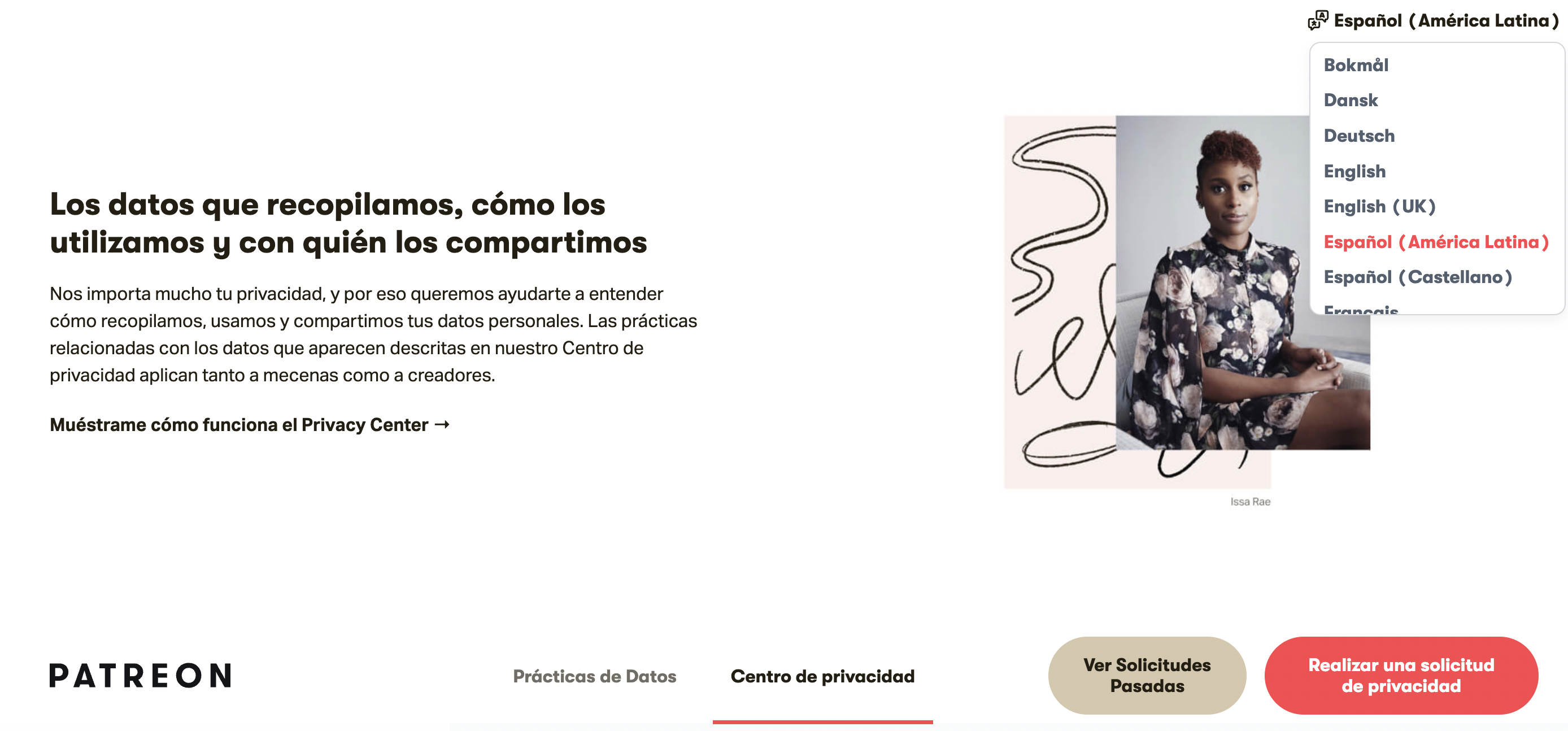
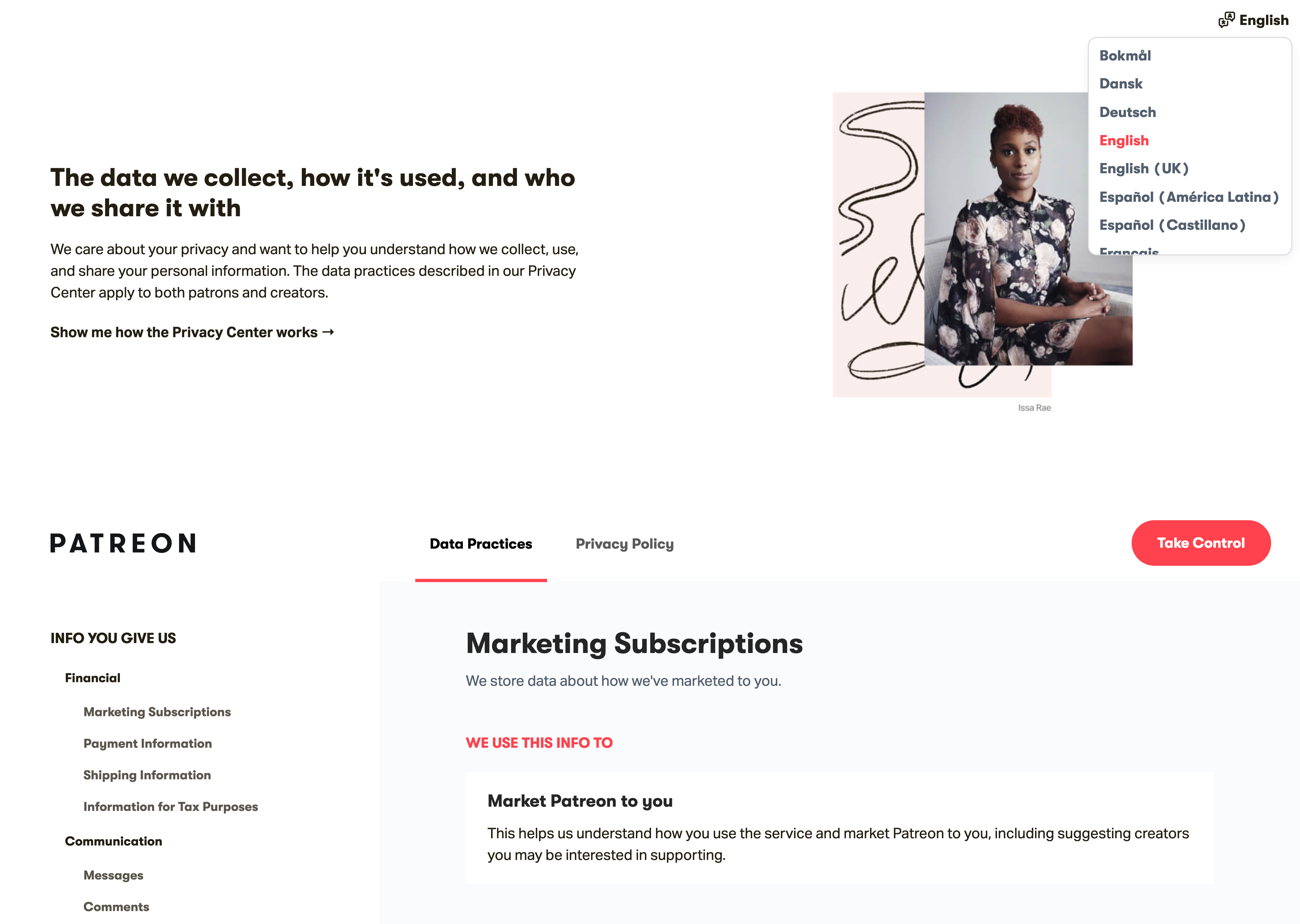
When multiple locales are available, the Privacy Center will display a language dropdown in the top right corner of the hero banner, from where the user can select their desired language.
To automatically display the Privacy Center in a user's browser language, enable the "Prefer Browser Default Language" setting in General Settings. When enabled, the Privacy Center will load in the language set by the user's browser, falling back to your configured default language if the browser language cannot be determined. The user's browser language will also need to be one of the "Supported Languages" , as defined above. When disabled, the Privacy Center will always load in your configured default language regardless of the user's browser settings.
Messages & Other Text
Translations for the text content in the Privacy Center and email templates are provided out of the box. When a user elects to view the Privacy Center in one of your supported languages, Transcend will automatically translate text to that language without any additional configuration.
Transcend automatically provides translations for default system messages and email templates. You can override any of them with your own translations. Custom or legal content you create (policies, disclosures, etc.) will not be automatically translated and will need to be provided.
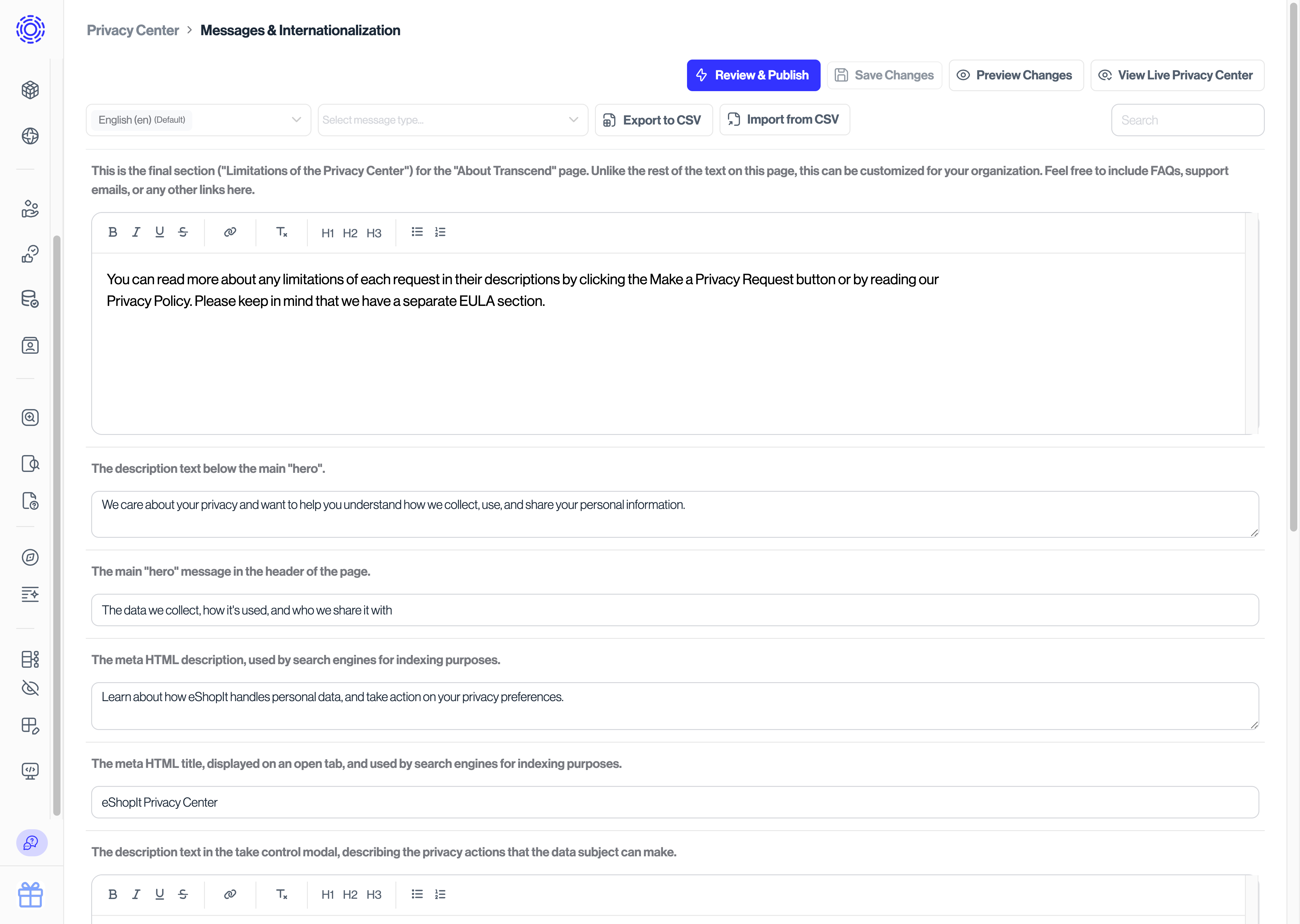
These messages can be edited under the "Content" tab of the Privacy Center section, where each translation can be typed into its respective caption's input. Here you are also able to import and export all the messages that would appear on the Privacy Center or on email templates.
Privacy Policies
Transcend does not auto-translate privacy policies, as they are important legal documents and exact phrasing and wording is important. Your organization will be responsible for providing each translation of the documents in the respective languages for selected locales.
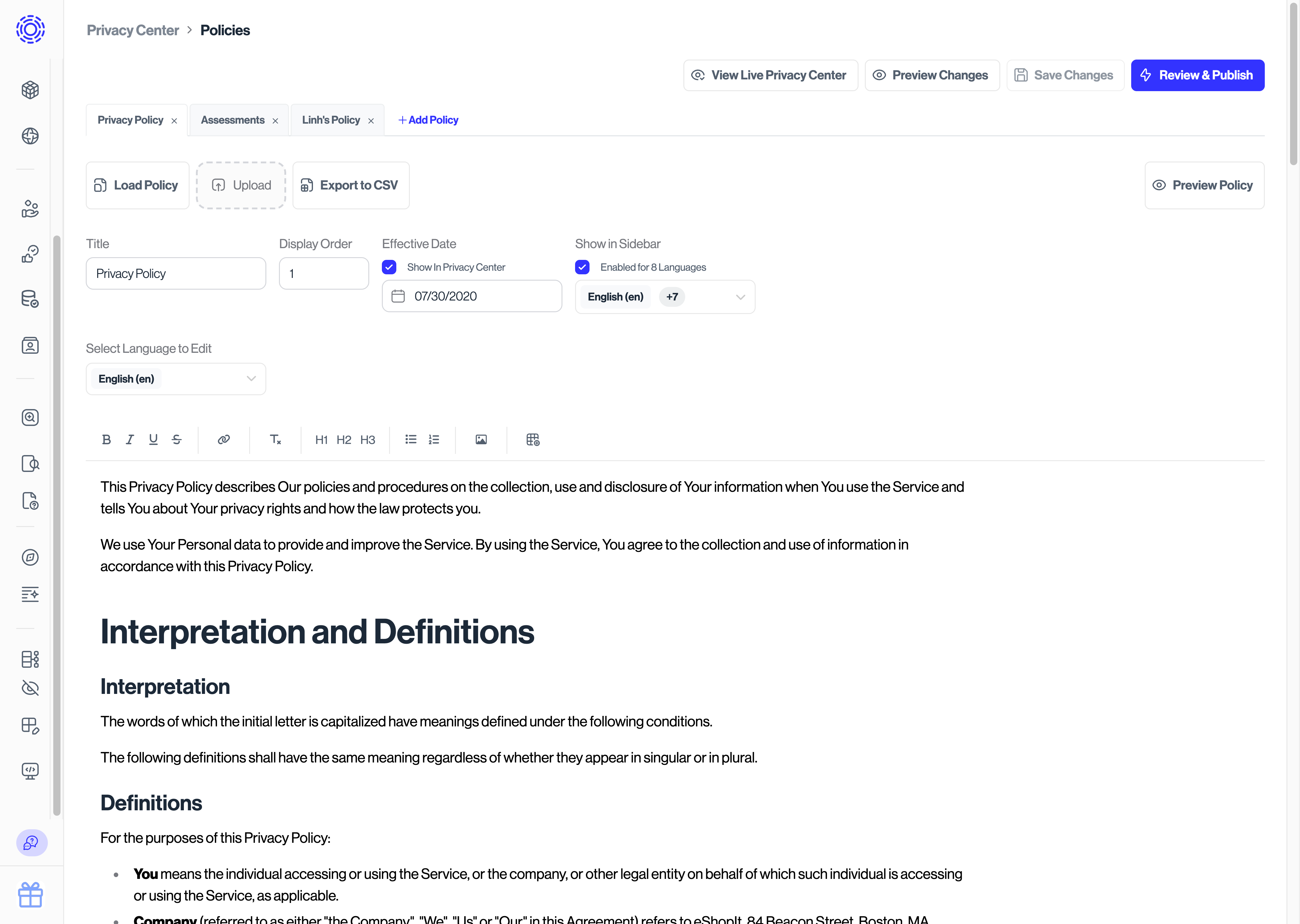
To add a translation for your privacy & legal policies, navigate to the "Policies" tab of the Privacy Center section and select the language dropdown next to "Effective Date". Any "supported languages" set in General Settings will be available in this dropdown. Select a language from the dropdown to add a translated version of your policy.
FAQs
- If contents are modified in the Email Templates section, does this automatically flow to the Privacy Center - Content space?
Yes, all the email templates created will appear in the
Privacy Center - Contentpage. - When a new template is added in the Email Templates section, is a corresponding message automatically created in the Content tab? Yes, any text that would be exposed to a data subject throughout the Privacy Center or email templates will show up in that section.
- If the content for an email template is updated from the Content tab, will the change be reflected in the Email Template section as well? Yes, if you update the default value in Content view, it updates the same contents shown in the Email Templates view.
- What language codes does Transcend support? Transcend currently supports the following 2 & 4 character locale codes. These languages come with out-of-the-box translations. Please reach out to support if you would like to request an additional code. It normally takes 2-3 business days to add a new locale code.
| Name | Language code |
|---|---|
| English | en |
| Arabic | ar |
| French | fr |
| Spanish | es |
| German | de |
| Italian | it |
| Japanese | ja |
| Russian | ru |
| Afrikaans | af |
| Bulgarian | bg |
| Chinese | zh |
| Croatian | hr |
| Czech | cs |
| Danish | da |
| Finnish | fi |
| Greek | el |
| Hindi | hi |
| Hungarian | hu |
| Korean | ko |
| Lithuanian | lt |
| Malay | ms |
| Marathi | mr |
| Norwegian Bokmål | nb |
| Norwegian | no |
| Polish | pl |
| Portuguese | pt |
| Romanian | ro |
| Serbian | sr |
| Swedish | sv |
| Tamil | ta |
| Thai | th |
| Turkish | tr |
| Ukrainian | uk |
| Vietnamese | vi |
| Zulu | zu |
| Hebrew | he |
| Hebrew | iw |
| Dutch | nl |
| Estonian | et |
| Icelandic | is |
| Latvian | lv |
| Maltese | mt |
| Slovak | sk |
| Slovenian | sl |
| Filipino | fil |
| Bosnian | bs |
| Catalan | ca |
| Basque | eu |
| Galician | gl |
| Divehi | dv |
| Urdu | ur |
| Albanian | sq |
| Amharic | am |
| Armenian | hy |
| Azerbaijani | az |
| Bangla | bn |
| Dari | fa-AF |
| Persian | fa |
| Filipino | tl |
| Georgian | ka |
| Gujarati | gu |
| Haitian Creole | ht |
| Hausa | ha |
| Irish | ga |
| Kannada | kn |
| Kazakh | kk |
| Macedonian | mk |
| Malayalam | ml |
| Mongolian | mn |
| Pashto | ps |
| Punjabi | pa |
| Sinhala | si |
| Somali | so |
| Swahili | sw |
| Telugu | te |
| Uzbek | uz |
| Welsh | cy |
| Arabic (United Arab Emirates) | ar-AE |
| French (France) | fr-FR |
| German (Germany) | de-DE |
| Austrian German | de-AT |
| Swiss High German | de-CH |
| Italian (Italy) | it-IT |
| Italian (Switzerland) | it-CH |
| Afrikaans (South Africa) | af-ZA |
| Bulgarian (Bulgaria) | bg-BG |
| Chinese (China) | zh-CN |
| Chinese (Taiwan) | zh-TW |
| Simplified Chinese | zh-Hans |
| Croatian (Croatia) | hr-HR |
| Czech (Czechia) | cs-CZ |
| Danish (Denmark) | da-DK |
| British English | en-GB |
| Canadian English | en-CA |
| English (United Arab Emirates) | en-AE |
| Finnish (Finland) | fi-FI |
| Greek (Greece) | el-GR |
| Hindi (India) | hi-IN |
| Hungarian (Hungary) | hu-HU |
| Indonesian (Indonesia) | id-ID |
| Japanese (Japan) | ja-JP |
| Korean (South Korea) | ko-KR |
| Lithuanian (Lithuania) | lt-LT |
| Malay (Malaysia) | ms-MY |
| Malay (Singapore) | ms-SG |
| Marathi (India) | mr-IN |
| Norwegian (Norway) | no-NO |
| Norwegian Bokmål (Norway) | nb-NO |
| Polish (Poland) | pl-PL |
| Brazilian Portuguese | pt-BR |
| European Portuguese | pt-PT |
| Romanian (Romania) | ro-RO |
| Russian (Russia) | ru-RU |
| Serbian (Latin, Serbia) | sr-Latn-RS |
| Serbian (Cyrillic, Serbia) | sr-Cyrl-RS |
| Swedish (Sweden) | sv-SE |
| Tamil (India) | ta-IN |
| Thai (Thailand) | th-TH |
| Turkish (Türkiye) | tr-TR |
| Ukrainian (Ukraine) | uk-UA |
| Vietnamese (Vietnam) | vi-VN |
| Zulu (South Africa) | zu-ZA |
| American English | en-US |
| Australian English | en-AU |
| French (Belgium) | fr-BE |
| Canadian French | fr-CA |
| Swiss French | fr-CH |
| English (Ireland) | en-IE |
| Dutch (Netherlands) | nl-NL |
| Flemish | nl-BE |
| European Spanish | es-ES |
| Spanish (Argentina) | es-AR |
| Spanish (Costa Rica) | es-CR |
| Spanish (Chile) | es-CL |
| Spanish (Colombia) | es-CO |
| Mexican Spanish | es-MX |
| Latin American Spanish | es-419 |
| Chinese (Hong Kong SAR China) | zh-HK |
| Hebrew (Israel) | he-IL |
| Hebrew (Israel) | iw-IL |
| English (New Zealand) | en-NZ |
| Estonian (Estonia) | et-EE |
| Icelandic (Iceland) | is-IS |
| Latvian (Latvia) | lv-LV |
| Maltese (Malta) | mt-MT |
| Slovak (Slovakia) | sk-SK |
| Slovenian (Sierra Leone) | sl-SL |
| Filipino (Philippines) | fil-PH |
| Albanian (Albania) | sq-AL |
| Albanian (North Macedonia) | sq-MK |
| Albanian (Kosovo) | sq-XK |
| Amharic (Ethiopia) | am-ET |
| Armenian (Armenia) | hy-AM |
| Azerbaijani (Azerbaijan) | az-AZ |
| Bangla (Bangladesh) | bn-BD |
| Bangla (India) | bn-IN |
| Bosnian (Bosnia & Herzegovina) | bs-BA |
| Bosnian (Cyrillic, Bosnia & Herzegovina) | bs-Cyrl-BA |
| Bosnian (Latin, Bosnia & Herzegovina) | bs-Latn-BA |
| Catalan (Spain) | ca-ES |
| Catalan (Andorra) | ca-AD |
| Catalan (France) | ca-FR |
| Catalan (Italy) | ca-IT |
| Filipino (Philippines) | tl-PH |
| Georgian (Georgia) | ka-GE |
| Gujarati (India) | gu-IN |
| Haitian Creole (Haiti) | ht-HT |
| Hausa (Nigeria) | ha-NG |
| Hausa (Niger) | ha-NE |
| Hausa (Ghana) | ha-GH |
| Irish (Ireland) | ga-IE |
| Kannada (India) | kn-IN |
| Kazakh (Kazakhstan) | kk-KZ |
| Macedonian (North Macedonia) | mk-MK |
| Malayalam (India) | ml-IN |
| Mongolian (Mongolia) | mn-MN |
| Pashto (Afghanistan) | ps-AF |
| Punjabi (Gurmukhi, India) | pa-Guru-IN |
| Punjabi (Arabic, Pakistan) | pa-Arab-PK |
| Sinhala (Sri Lanka) | si-LK |
| Somali (Somalia) | so-SO |
| Somali (Djibouti) | so-DJ |
| Somali (Ethiopia) | so-ET |
| Somali (Kenya) | so-KE |
| Swahili (Kenya) | sw-KE |
| Swahili (Tanzania) | sw-TZ |
| Swahili (Uganda) | sw-UG |
| Congo Swahili | sw-CD |
| Telugu (India) | te-IN |
| Urdu (Pakistan) | ur-PK |
| Urdu (India) | ur-IN |
| Uzbek (Uzbekistan) | uz-UZ |
| Welsh (United Kingdom) | cy-GB |
| Basque (Spain) | eu-ES |
| Galician (Spain) | gl-ES |