Configuring Show & Hide Logic in Assessments
Use Show & Hide logic to control which questions and sections appear in an assessment based on earlier answers. This lets you keep long questionnaires focused, reduce noise for respondents, and support branching flows (e.g., only show DPIA‑related questions when a high‑risk answer is selected).
- Show or hide follow‑up questions based on answers to earlier questions (e.g., only show “Describe your data minimization approach” when GDPR is selected as a regulation).
- Build multi‑condition rules (logical AND/OR) that depend on answers to several questions within the same section (e.g., show an AI‑risk section when both “Uses AI” and “Processes sensitive data” are selected).
Show & Hide logic is configured at the template level:
- Go to Assessments > Templates.
- Open an existing template or create a new one.
You can only add or change Show & Hide logic while a template is in Draft. If a template is already Published, first unpublish (or save a new draft/duplicate), configure your Show & Hide logic, and then publish it again.
If a template already has active assessments associated with it, you can’t unpublish or edit that template. Create a new template (or duplicate the existing one), update it there, and use the new version for future assessments.
3. Within a section, select the question whose answer should drive conditional behavior (the source question).
4. Use the Advanced Settings panel on that question to add Show & Hide logic rules:
- Define which responses to the source question should trigger logic. For example:If the answer to “What security measures are implemented to protect the data?” is equal to “Unknown”, then trigger [an] additional follow‑up question(s).
- Specify which questions or sections should be shown or hidden when those conditions are met.
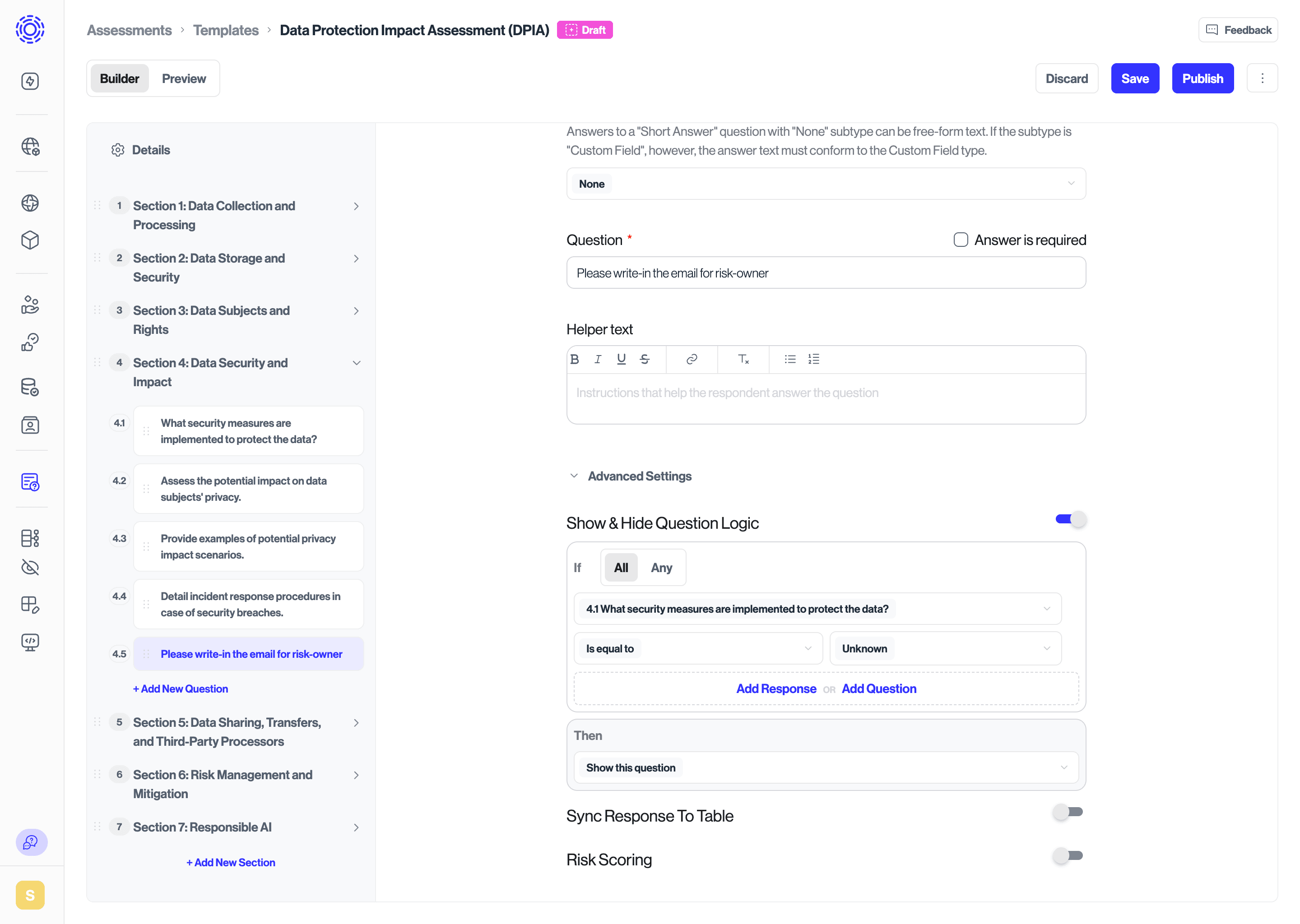
- Conditions can reference previous questions in the same section.
- Cross‑section “if A then show section B” logic is deliberately limited to preserve section assignment behavior (sections can be assigned to different assignees).
- The first question of a section cannot depend on earlier questions in that same section, since no prior questions exist there.