California DROP with Transcend
California's Delete Act requires registered data brokers to process consumer deletion requests through DROP (Delete Request and Opt-out Platform), run by CalPrivacy. This overview explains how Transcend fits into that workflow: what we cover, what stays on your side, and how to plan volume.
This is not legal advice. For the rules, see CalPrivacy's DROP materials and Transcend's DROP compliance guide. For configuration and a full cycle, see Set up and run California DROP.
Consumers register once with the state. DROP sends brokers hashed identifier lists (not plaintext emails or phones). You match those hashes to people in your systems, delete them (or opt out where required), and report a status back for every record.
Division of labor
- You match hashes against your identity graph and produce a matched-records CSV.
- Transcend pulls the hashed CPPA download from CalPrivacy (when configured), turns your matched records into erasure data subject requests (DSRs), runs them through your selected erasure workflow, and builds the CalPrivacy report-back file (
Id,Status). - In the current operator-led flow, you still upload the report-back file to CalPrivacy.
Transcend does not reverse hashes or invent matches.
Brokers must begin processing by August 1, 2026, on a 45-day cycle. The clock starts when the production list is first downloaded. A later re-download should not be treated as restarting it. Avoid downloading the same cycle independently through both CalPrivacy and Transcend. See CalPrivacy's Processing DROP requests guidance.
| Name | Shape | Direction |
|---|---|---|
| CPPA download | Id,Hash (one CSV per list type, usually in a ZIP) | CalPrivacy → Transcend / you |
| Matched records | CamelCase CSV (see below) | You → Transcend |
| Report-back | Id,Status | Transcend generates; you submit to CalPrivacy (current phase) |
Avoid older shorthand like “File 1 / File 2” in customer-facing docs and integrations.
| Step | Who | Notes |
|---|---|---|
| Get the hashed list (CPPA download) | Transcend (API poll) or you (manual upload) | Transcend pulls with your broker API key when configured. |
| Index records | Transcend | After pull, Transcend materializes one DB row per CPPA work item so matching and DSRs can run. |
| Match hashes | You | Standardize + hash per CalPrivacy rules; emit matched records. |
| Create and run erasures | Transcend | Matched records become DSRs on your selected Internal erasure workflow (must have a data subject configured). |
| Report back | Transcend generates; you submit | Id,Status CSV for every CPPA download id. |
Upload camelCase headers. Exact names matter. Before upload, rename or map legacy snake_case columns: person_key becomes coreIdentifier, and fields such as drop_record_id and status_override must use their current built-in names.
dropRecordId,dropListType,hash,cppaStatusCode,coreIdentifier,email,phone| Column | Required | Meaning |
|---|---|---|
dropRecordId | Yes | One CPPA download Id per row (echo verbatim). Production ids are 12-character Base62; sandbox may be numeric. |
dropListType | Yes | email, phone, maid, ctv, ndz, or name_vin. |
coreIdentifier | Recommended | Stable value used to group rows into one DSR. It may be an immutable internal person ID or an email. Use the same value on every row for that person. |
email / phone / custom columns | When needed by your workflow | Plaintext identifiers used to locate and erase the person. An email cell may be blank, including on an email-list row, when coreIdentifier or another usable identifier is populated. |
cppaStatusCode | Optional | Declare `2` (exempt) or `4` (opted out) instead of creating a DSR. Leave empty for normal erasures. Do not declare 3 or 5. |
hash | Optional | Present on starter-file downloads for convenience; bookkeeping only. |
Row model: CalPrivacy issues one work-item id per hashed identifier per list. The same person on email + phone + MAID is three rows, three dropRecordIds, one shared coreIdentifier → one DSR.
Records left out of the matched-records upload—including an NDZ list with no matches—report as status 5 (not found). Auxiliary files such as *_removed.csv do not require matched rows or a report-back response file.
coreIdentifier does not need to be an email. Use a stable, unique value such as an immutable internal person ID or an email. If your source file uses person_key, map it to coreIdentifier before upload.
- Use the same coreIdentifier on every row for that person.
- Email may be blank when coreIdentifier or another usable identifier is populated. Include plaintext identifiers that your erasure workflow needs.
- Keep custom identifier column names aligned with the identifiers configured for request ingestion.
- After upload, spot-check one DSR and confirm its core identifier and the identifiers needed by your workflow.
Details are in Set up and run California DROP.
Operator-led Admin Dashboard loop with a six-step run wizard:
- Enable Data Broker DROP under Administration → Early Access.
- Configure broker credentials and an Internal erasure workflow (with a data subject).
- Pull CPPA requests now (or upload a CPPA download manually if your account team supports that path).
- Wait for record indexing to complete.
- Download a matched-records starter template from the run wizard (optional but recommended).
- Upload matched records in the run wizard; Transcend creates DSRs.
- Generate report-back; download; submit to CalPrivacy; mark submitted in Transcend.
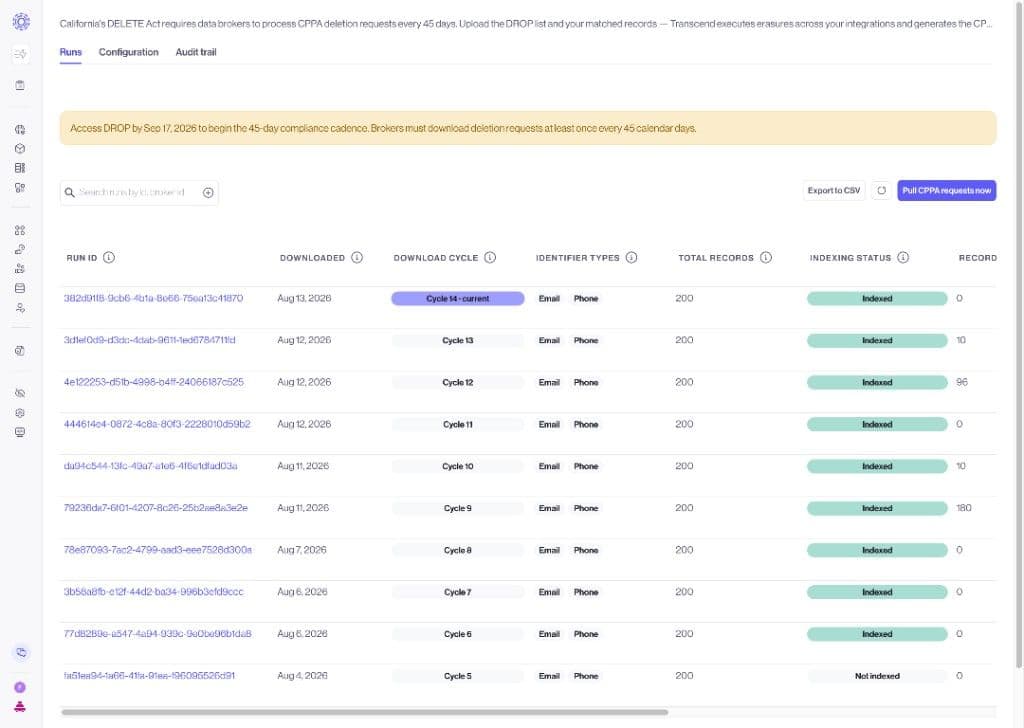
Your account team can help you complete a sandbox cycle before production. Organization admins can also flip Early Access themselves.
- Automated matched-records upload via API for high-volume pipelines
- Scheduled, hands-off polling
- Transcend submitting report-back to DROP for you
- CLI / pipeline-first flows
- Multi-million-row single-shot uploads
If the current operator-led volume fits for August, you do not need later phases on day one.
DROP volume depends on how many Californians use DROP and which list types you subscribe to. Plan for growth each cycle.
Each browser upload accepts at most 250,000 matched rows. Split only the matched rows into additional CSVs and upload each file against the same run. Prefer one open run at a time and finish the prior report-back before pulling the next list.
CPPA download rows are hashed identifiers, not people. Use the same stable coreIdentifier across a person’s email, phone, and MAID matches so Transcend opens one DSR.
The CPPA download contains Id and Hash. Standardize identifiers as CalPrivacy specifies, SHA-256 hash them, Base64-encode the digest, and compare. For every hit, matched records carry the DROP id, list type, stable core identifier, and any plaintext identifiers your erasure workflow needs. Alternatively, declare cppaStatusCode 2 or 4 when applicable.
Treat each Id as opaque: sandbox downloads have used numeric ids; production uses CalPrivacy's 12-character Base62 format. Echo the exact value you received.
Report-back is an Id,Status CSV. Every CPPA download id gets one status: exempt (2), deleted (3), opted out (4), or not found (5). Details are in Set up and run California DROP.
Do we still need the CalPrivacy portal? Yes in the current phase. You need CalPrivacy for registration, keys, and uploading the report-back.
Do we publish a DROP workflow to the Privacy Center? No. Use an Internal erasure workflow selected in DROP Configuration. Keep “Show in Privacy Center” off unless you want that erasure action on your Privacy Center for other reasons. The workflow must have a data subject configured, or DSR creation fails.
Can we use our internal person key as coreIdentifier? Yes. Use a stable, unique, immutable person ID and repeat it across every matched row for that person. Map a legacy person_key column to coreIdentifier before upload.
Do sandbox and production CPPA downloads look identical? Same Id,Hash columns and status codes; different environment and API key. Work item id shape may differ (numeric sandbox vs Base62 production). Validate hashing and a full cycle in sandbox, then confirm id format against a production download before go-live.
Do we report before pulling the next list? Yes: finish and submit the prior report-back before you pull the next list. Cadence is “report, then pull.”
- Confirm you are (or will be) a registered California data broker.
- Share list types and rough volume per 45-day cycle with your Transcend contact.
- Follow Set up and run California DROP for configuration and a sandbox end-to-end run — especially the
coreIdentifierchecklist before your first production upload.