Set up and run California DROP
This guide walks through enabling DROP (Delete Request and Opt-out Platform) in Transcend and running one operator-led cycle: pull the CPPA download from CalPrivacy, index records, build and upload matched records in the run wizard, run erasures, and generate the report-back file.
New to DROP? Start with California DROP with Transcend for concepts, scope, and volume planning. Data brokers must begin processing by August 1, 2026, on a 45-day cycle. This article is not legal advice.
- A CalPrivacy data broker account and CPPA-issued broker ID.
- DROP enabled on your Transcend organization via Early Access (see Enable Data Broker DROP below).
- A DROP API key from CalPrivacy for the environment you will use. Transcend pulls the CPPA download through the DROP API. Start in sandbox.
- An Internal Workflows V2 erasure workflow (not published to the Privacy Center) with a data subject selected. See the Workflows quickstart if you need to create one.
- A way to match CalPrivacy’s hashed identifiers against your records and produce a matched-records CSV. Transcend does not match for you.
Choose a stable coreIdentifier—an immutable internal person ID or an email—and repeat it on every matched row for the same person.
DROP ships behind an Early Access feature gate. An organization admin can turn it on without waiting on Transcend:
- Open Administration → Early Access in the Admin Dashboard.
- Find Data Broker DROP and turn it On.
- Refresh the Admin Dashboard. DROP Requests appears in the left navigation.
Details on Early Access gates: Early Access Features.
Organization admins manage Early Access. If Data Broker DROP is missing or blocked for your org, contact your Transcend account team.
Open DROP Requests → Configuration. This is a one-time, per-organization setup.
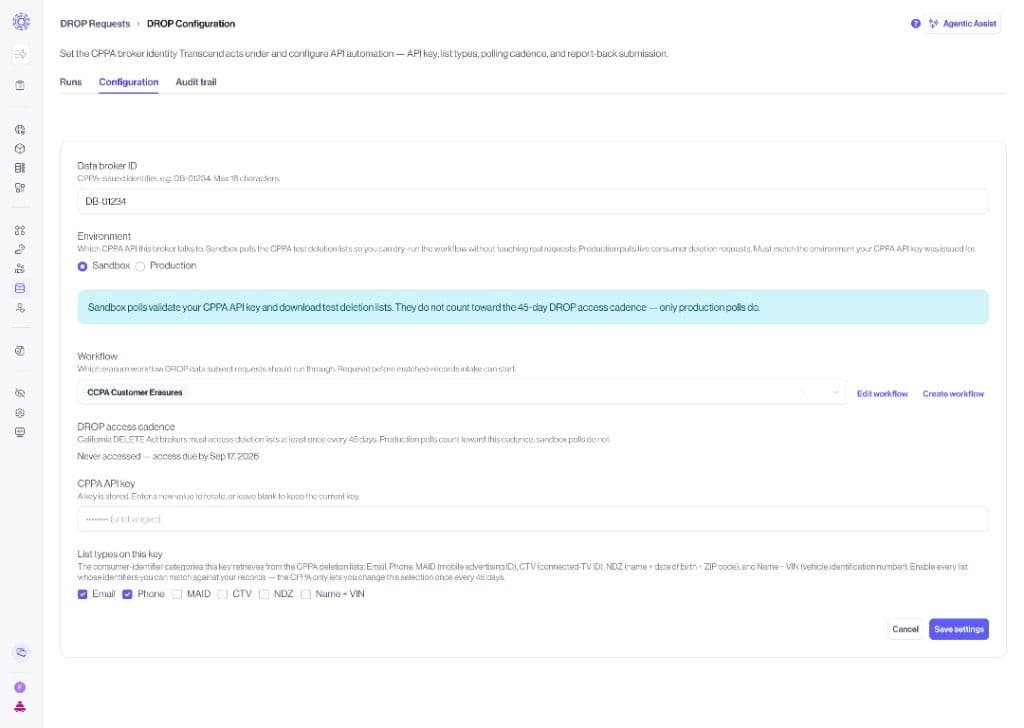
| Setting | Notes |
| Broker ID | Your CalPrivacy-issued identifier (e.g. DB-#####). Echoed into report-back filenames. |
| Environment | Sandbox while you test; production for live cycles. |
| List types | The deletion-list types you process (email, phone, maid, ctv, ndz, name_vin). |
| Erasure workflow | Select the Internal erasure workflow DROP requests should run through. It must have a data subject. DROP data subject request (DSR) creation fails with “No subject associated with workflowConfigId…” if the subject is missing. |
| DROP API key | Your CalPrivacy DROP API key for the selected environment. |
Click Save settings. Prefer sandbox credentials first. Changing the data broker ID or environment clears the stored API key — re-enter the key before saving.
Sandbox pulls validate your CPPA API key and download test deletion lists. They do not count toward the 45-day DROP access cadence — only production pulls do.
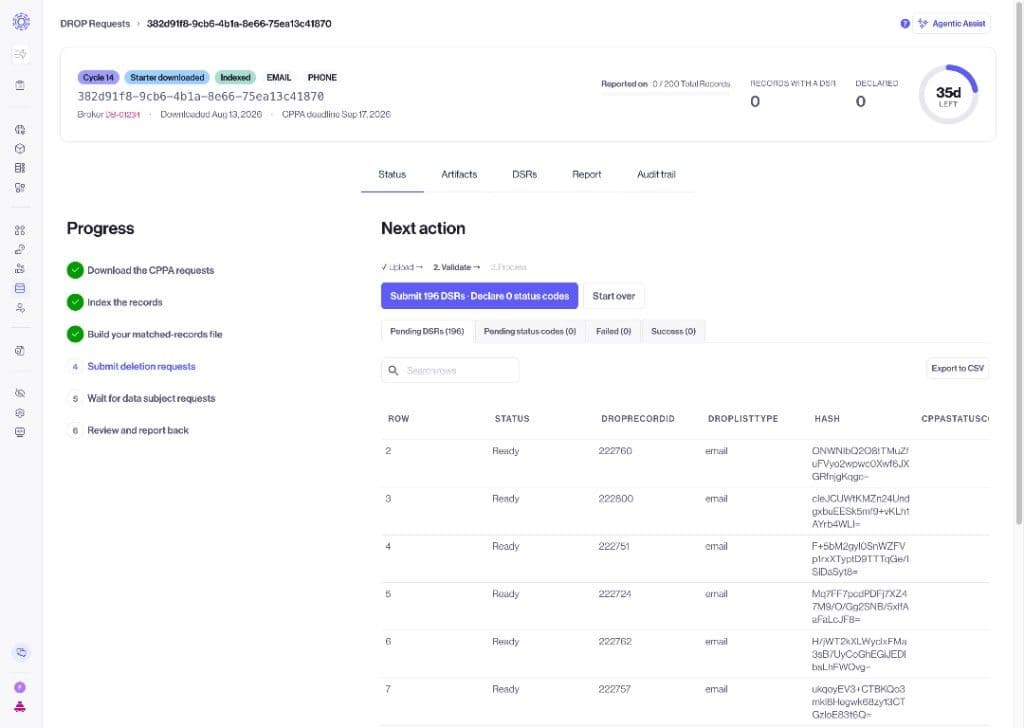
Each DROP run opens a Status wizard that tracks the cycle end to end:
- Download the CPPA requests
- Index the records
- Build your matched-records file
- Submit deletion requests
- Wait for data subject requests
- Review and report back
The Runs tab lists every download cycle, indexing status, and CPPA deadline countdown. Use Pull CPPA requests now to start a new cycle.
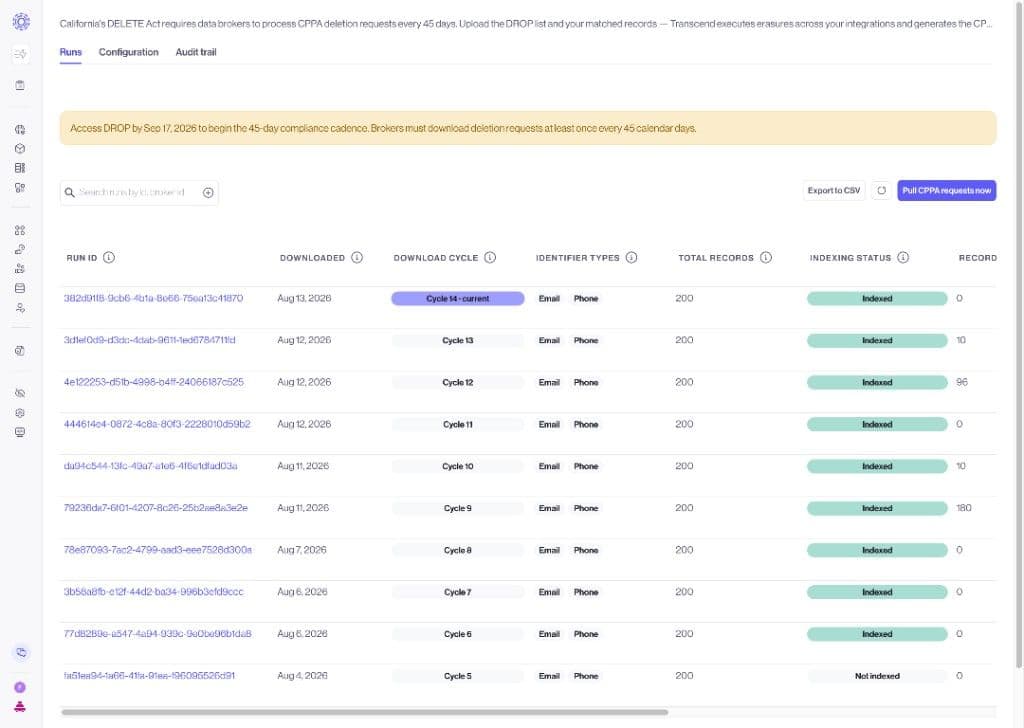
On DROP Requests → Runs, click Pull CPPA requests now. Prefer one open run at a time and finish the prior report-back before polling the next list. A production download counts as access: avoid downloading the same cycle independently through both CalPrivacy and Transcend, and do not treat a later re-download as restarting the original 45-day window.
Wait until indexing completes on the run (Indexed status). Indexing materializes one row per CPPA work item. Matching and starter-file download only work against indexed records. If indexing stops early, use Index records / resume on the run page.
On the run Status tab, download the outstanding starter file (or all indexed records). The starter includes dropRecordId, dropListType, optional hash, cppaStatusCode, coreIdentifier, email, phone, and your org’s configured identifier columns.
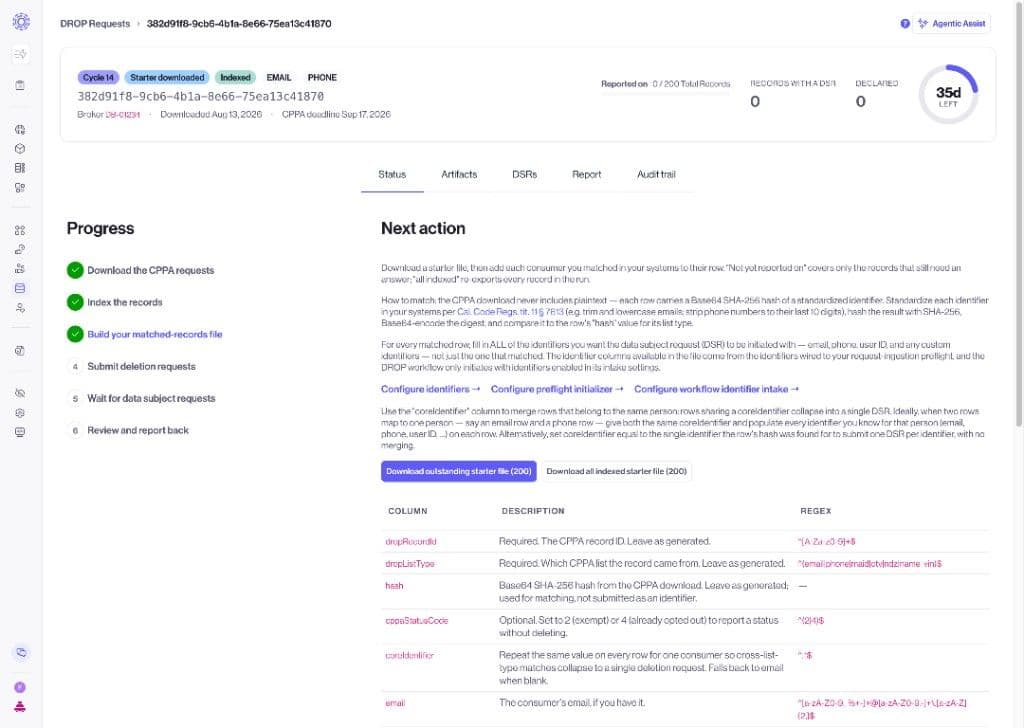
Match hashed identifiers against your records using CalPrivacy’s standardization and hashing rules, then fill the matched-records CSV using the shape and coreIdentifier rules below.
Still on the run Status tab, choose CSV to upload your matched-records file (or apply a declared status to remaining records). Anything left without a DSR or declared status reports to CalPrivacy as not found (status 5).
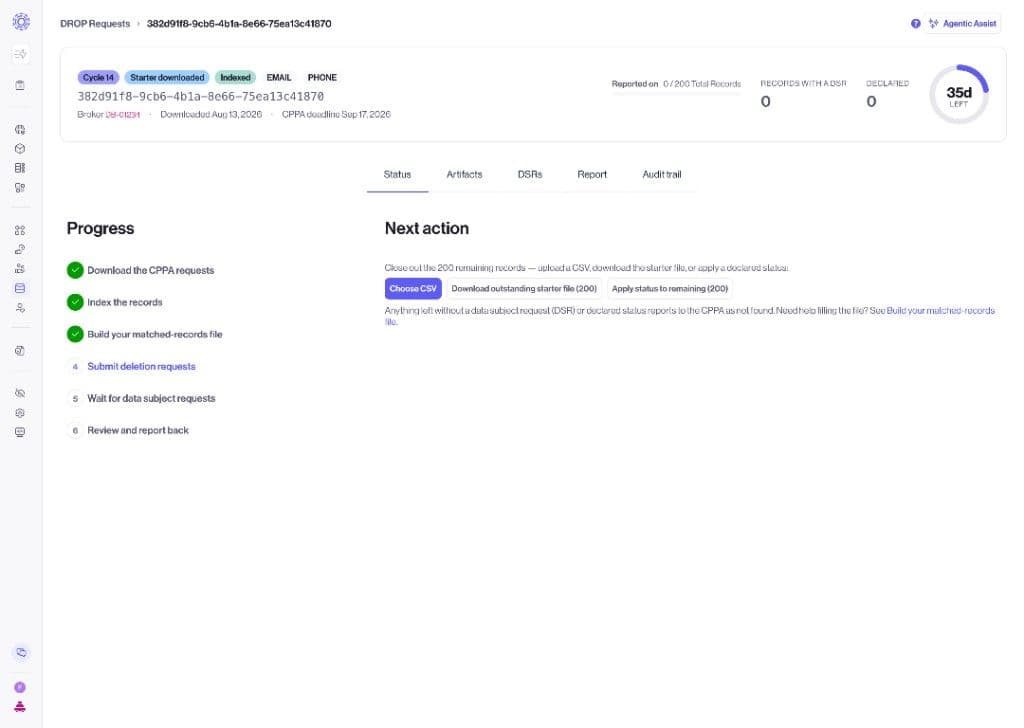
The upload wizard validates rows, then lets you submit DSRs and declare status codes. Built-in camelCase columns are recognized automatically; additional identifier columns must match identifiers configured for request ingestion. Transcend groups rows that share the same coreIdentifier into one erasure request.
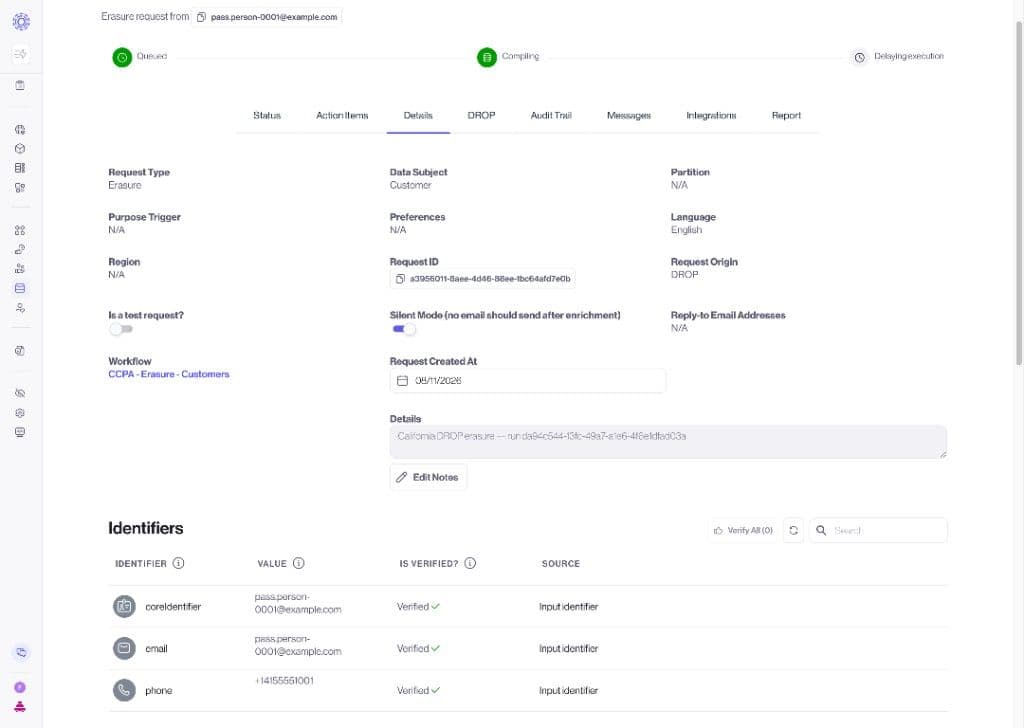
Erasures run through your selected workflow and connected integrations. Spot-check one DSR immediately: confirm its core identifier and the plaintext identifiers your workflow needs. If those values are missing, stop the batch and correct the file before continuing.
On the run detail page, generate the report. Transcend builds the CalPrivacy report-back file once every request in the run has reached a terminal state, or once the run has passed its 45-day deadline. Download the report-back CSV, upload it to the CalPrivacy Data Broker Portal, then mark the run submitted in Transcend.
Headers are camelCase and exact names matter. Column order does not matter. Each CSV may contain at most 250,000 matched rows; split only matched rows and upload every part against the same run.
dropRecordId,dropListType,hash,cppaStatusCode,coreIdentifier,email,phone| Column | Required | Notes |
dropRecordId | Yes | Echo the CPPA download Id verbatim (string, never an Excel float). |
dropListType | Yes | Lowercase list type from the download. |
coreIdentifier | Recommended | Use a stable, unique value such as an immutable internal person ID or an email. Repeat it across every row for the same person. |
email / phone / custom | When needed by your workflow | Put plaintext identifiers in the appropriate columns when your erasure workflow needs them. Email may be blank, including on an email-list row, when coreIdentifier or another usable identifier is populated. |
cppaStatusCode | Optional | Only 2 (exempt) or 4 (opted out) when declaring instead of erasing. Leave blank for normal erasures. Do not send 3 or 5. |
hash | Optional | Safe to keep from the starter file; not required for intake. |
Map legacy headers before upload: person_key becomes coreIdentifier. Do not send drop_record_id, drop_list_type, status_override, matched_on, matched_value, or report_status.
Row model: one DROP id per hashed identifier per list. Same person on email + phone + MAID → three rows, three dropRecordIds, one coreIdentifier.
Records omitted from the upload—including an NDZ list with no matches—report as status 5 (not found). Auxiliary files such as *_removed.csv do not require matched rows or a report-back response file.
coreIdentifier does not need to be an email. Use a stable, unique value such as an immutable internal person ID or an email. If your source file uses person_key, map it to coreIdentifier before upload.
On every matched-records row for the same person:
- Set coreIdentifier to the same stable internal person ID or email.
- Include email, phone, or custom identifiers when your selected erasure workflow needs them. An email cell may be blank when coreIdentifier is populated.
- Keep custom identifier column names aligned with the identifiers configured for request ingestion.
- After upload, spot-check one DSR and confirm its core identifier and the identifiers needed by your workflow.
dropRecordId,dropListType,hash,cppaStatusCode,coreIdentifier,email,phone,maid
A7kP2xQ9Lm4R,email,HASH_EMAIL,,person-0003,,,
B8mQ3yR0Mn5S,phone,HASH_PHONE,,person-0003,,+14155551001,
C9nR4zS1No6T,maid,HASH_MAID,,person-0003,,,IDFA-0000-EXAMPLE
→ one person, three DROP record ids, one deletion request. coreIdentifier is the same stable internal person ID on every row; the email cell may be blank when the request has another usable identifier.
CalPrivacy’s lists contain one row per hashed identifier, so the same person can appear more than once (for example email and phone). Transcend groups matched-records rows by coreIdentifier before creating a request, and attaches every contributing DROP record id to that request for accurate report-back. DROP-originated requests show Request Origin: DROP on the Details tab.
Sandbox CPPA downloads may use numeric ids. Production ids are typically 12-character Base62. Always copy the exact id into dropRecordId and into report-back.
| Code | Meaning |
2 | Exempt — match found, but data is exempt from deletion (or declared exempt at intake). |
3 | Deleted — match found and non-exempt personal information was deleted (earned when the DSR completes; do not declare at intake). |
4 | Opted out — multiple consumers share the identifier; all were opted out of sale or sharing (or declared at intake). |
5 | Not found — no matched-records row, or the request did not reach a terminal state before the deadline. |
Do I submit the report-back file myself? Yes in the current phase. Transcend generates the file; you download it and upload it to the CalPrivacy portal.
Will one person create multiple erasure requests? No, if every matched row uses the same coreIdentifier. Transcend creates one request that still carries every DROP record id for that person.
Can email be blank on an email-list match? Yes, when coreIdentifier or another usable identifier is populated. Keep the matched row and leave cppaStatusCode blank for a normal erasure.
Does Transcend store matched records in plaintext? Matched identifiers use the same encrypted request pipeline as other data subject requests. Browser intake encrypts identifiers to your Sombra key before submit.
What if requests are still open near the 45-day deadline? Transcend blocks report generation while requests are pending, with an exception once the run passes its deadline, so you are never stuck unable to report.
Is sandbox different from production? Mostly the same CSV shapes and status codes, with a different environment and API key. One known difference: CalPrivacy sandbox downloads have used numeric work item ids, while CalPrivacy’s published specifications describe ids as 12-character Base62 strings. Treat Id / dropRecordId as an opaque string you echo back. Finish one full sandbox cycle — including a DSR Identifiers spot-check — before switching to production.
Upload failed with “No subject associated with workflowConfigId”? Open the erasure workflow selected in DROP Configuration and set a data subject, then publish if needed. Retry the matched-records upload.
Can I turn DROP on myself? Yes — Administration → Early Access → Data Broker DROP → On. If the gate is blocked for your organization, ask your Transcend account team.
- Concepts and planning: California DROP with Transcend
- Regulatory source of truth: CalPrivacy DROP materials
- Workflows: Workflows: Quickstart Guide
- Early Access: Early Access Features