Tableau Pre-flight Enrichment for DSR Automation
Use Tableau pre-flight enrichment to resolve additional identifiers before running Data Subject Access Requests.
Tableau pre-flight identity enrichment allows Transcend to look up additional identifiers from a published Tableau datasource before executing a DSR. This is useful when the identifier received in the request is not the same identifier you need to use elsewhere in your privacy workflow.
For example, a request may arrive with an email address, but downstream systems may require an internal customer ID, employee ID, or account ID. With a Tableau enricher, you can query a published Tableau datasource first, extract those additional identifiers, and then use them during the rest of the DSR workflow.
This is an advanced, optional setup. If your Tableau datapoints can already be queried directly with the incoming request identifier, you may not need pre-flight enrichment.
Use a Tableau enricher when:
- the request starts with one identifier, such as email
- your Tableau datasource can map that identifier to one or more additional identifiers
- those additional identifiers are needed for downstream DSR Automation
Common examples include:
- resolving an internal user ID from an email address
- resolving a customer account ID from a login identifier
- resolving multiple identifiers from a Tableau datasource before querying other systems
At a high level, Tableau pre-flight enrichment works in four steps:
- Transcend receives an incoming request identifier, such as an email address.
- Transcend runs a Tableau query against a published datasource using that identifier.
- The query returns one or more fields that contain additional identifiers.
- Transcend signs and stores those returned identifier values so they can be used later in the DSR workflow.
In the Admin Dashboard, create a new enricher and choose your Tableau data silo.
When Tableau is selected, the enricher form uses Tableau-specific field labels and validation. In particular:
- the database name field becomes
Datasource LUID - the SQL query editor becomes
Tableau Query Config - the query editor expects JSON rather than SQL
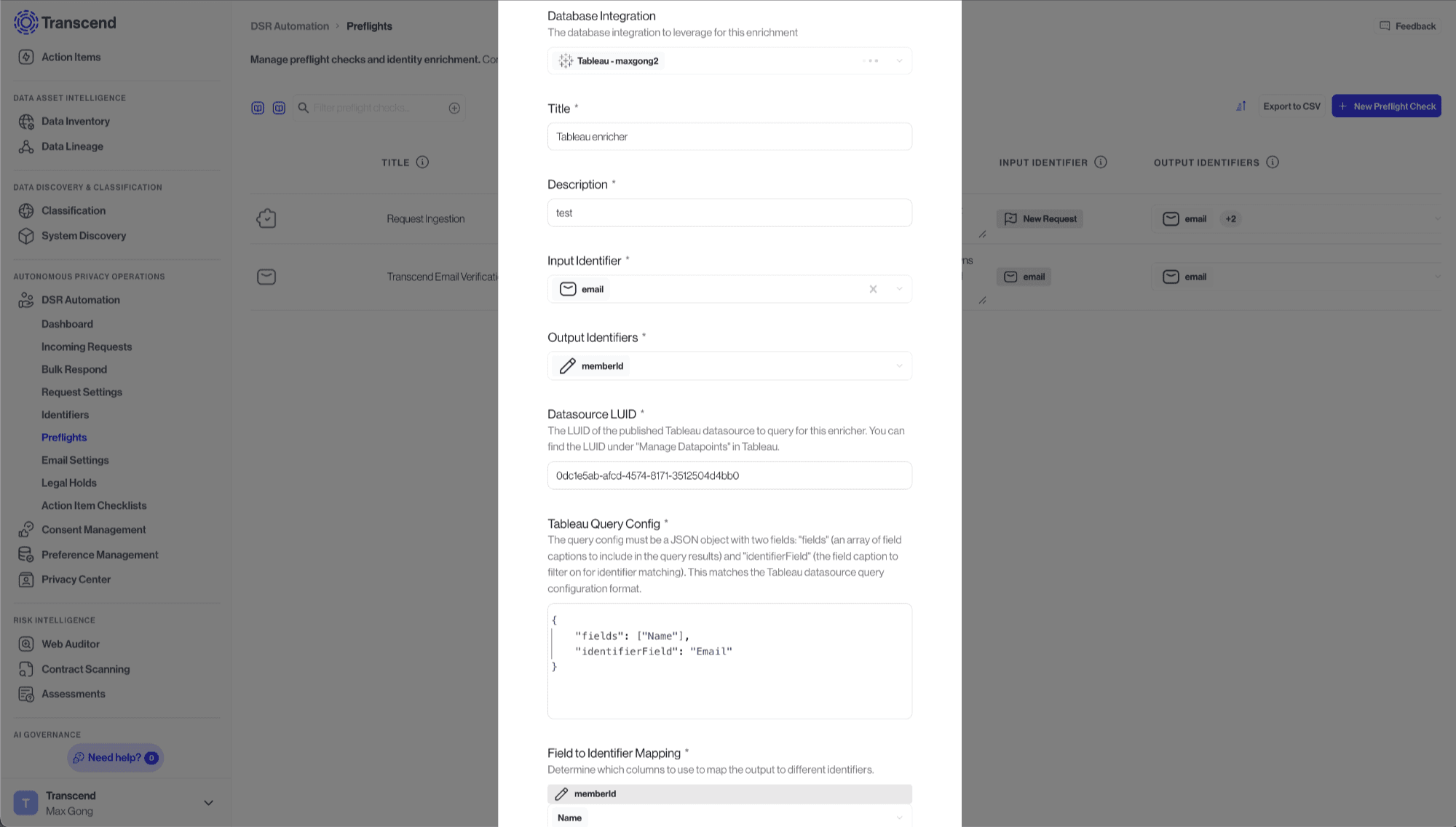
In the Datasource LUID field, enter the LUID of the published Tableau datasource that should be queried for enrichment.
Use the specific published datasource that contains the identifier relationships you want to resolve. This should be the Tableau datasource that can answer questions like:
- “Given this email address, what is the internal user ID?”
- “Given this identifier, what account ID or employee ID should be added to the request?”
In the Tableau Query Config field, enter a JSON object with the following required structure:
{
  "fields": ["Email Address", "Customer ID", "Account ID"],
  "identifierField": "Email Address"
}
The two required keys are:
fields: an array of Tableau field captions to return from the datasourceidentifierField: the Tableau field caption Transcend should use to match the incoming request identifier
- Use Tableau field captions exactly as they appear in the published datasource.
- Include every field you want to map into Transcend identifiers.
After entering the Tableau query config, configure the identifier mapping for the enricher.
The mapping tells Transcend which returned Tableau fields should be treated as which Transcend identifiers. This step is what turns Tableau query results into reusable identifiers for the rest of the privacy request workflow.
Suppose a request comes in with the identifier jane@example.com, but your downstream systems require customerId and accountId.
You could configure the Tableau enricher like this:
{
  "fields": ["Email Address", "Customer ID", "Account ID"],
  "identifierField": "Email Address"
}
Then configure the identifier mapping so that:
Customer IDmaps to your customer identifierAccount IDmaps to your account identifier
When the request runs, Transcend will query Tableau using jane@example.com, extract the returned IDs, and make those identifiers available for downstream DSR Automation.
Tableau enrichment works best when the published datasource exposes clean identifier relationships. Keep the following in mind:
- Tableau is a reporting layer, so it may not always be the canonical source for identifier resolution.
- The enrichment only works for fields available in the published datasource.
- Ambiguous or duplicate identifier values can lead to poor enrichment results.
- The fields available for identifier mapping come from the Tableau query config, so include all fields you want to map.
If your Tableau layer is derived from another system that stores these identifiers more directly, you may prefer to run enrichment against that underlying system instead.